Setting Compression for Provider REST Service Operations
This section discusses how to set compression for Provider REST service operations.
Understanding Setting Compression for Provider REST Service Operations
You use the Routings – Header Properties page (IB_ROUTINGRESTPROP) to specify the compression method that the providing system will accept on inbound requests from a consumer, as well as the compression method the provider is using on the response to the consumer.
The two properties to use to specify message compression on the provider system are Accept-Encoding and Content-Encoding.
For provider request and response headers set compression as follows:
| Field or Control | Description |
|---|---|
|
Provider Request Header |
Use the Accept-Encoding property for the Request Header to indicate the compression method the providing system will accept on inbound requests from the consumer. The information you specify here is included in generated WADL documents that you provide consumers. There are no values to select, rather you specify the compression method in the Comments field. The valid compression methods are:
|
|
Provider Response Header |
Use the Content-Encoding property for the Response Header to indicate the compression method used on the outbound response to the consumer. The information you specify here is included in generated WADL documents that you provide consumers. The compression method used should match the compression method that the consumer specifies in the connector properties in the inbound request. The valid values are:
|
Setting Compression for Provider REST Service Operations
Use the Routings – Header Properties page (IB_ROUTINGRESTPROP) to set compression for provider REST service operations. To access the page, select and click the Header Properties tab.
This example illustrates the Routings – Header Properties page.
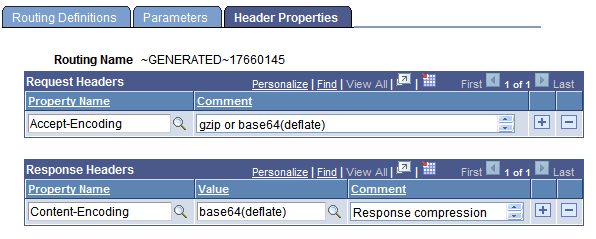
The previous example shows that the Request Header is set to Accept-Encoding and that the provider will accept requests that are gzip or base64 (deflate) compressed. The example shows that the Response Header is set to Content-Encoding and that the provider will send its response to the consumer base64 (deflate) compressed.
To set compression for provider REST service operations:
-
Access the Routings–Header Properties page:
-
Select and in the Existing Operations section click the name of the service operation. The Service Operations – General page appears.
-
Click the Routings tab and in the Routing Definitions grid click the name of the routing definition. The Routing-Definitions page appears.
-
Click the Header Properties tab.
-
-
Set the request header.
In the Request Headers section:
-
In the Property Name field click the Lookup button and choose Accept-Encoding from the list.
-
In the Comment field enter a comment regarding the compression method the provider system will accept for the inbound request from the consumer.
-
-
Set the response header.
In the Response Headers section:
-
In the Property Name field click the Lookup button and choose Content-Encoding from the list.
-
In the Value field click the Lookup button and choose the compression used for the response message to the consumer. The valid values are base64 (deflate) or gzip.
-
-
Click the Save button.
The other options featured on the Routings – Header Properties page are discussed elsewhere in the product documentation.
See Defining Routing Header Properties for Provider REST Service Operations.