Managing XML Message Schemas for Rowset-Based Messages
This section discusses how to:
-
View XML message schemas for rowset-based messages.
-
Exclude descriptions in XML message schemas.
-
Choose the number of level 0 rows to include in generated XML message schema.
-
Include namespaces in generated XML message schemas.
-
Suppress empty XML tags in message schema.
Viewing XML Message Schemas for Rowset-Based Messages
PeopleSoft Integration Broker automatically generates message schema for rowset-based messages when you save the message definition.
After you save a message definition on the Messages-Message Definitions page, click the Schema tab to view the generated XML message schema.
Excluding Descriptions in XML Message Schemas
Message data that is used to define services can have actual database record and field names in the generated XML message schema. PeopleSoft Integration Broker provides an option where you can exclude descriptions in generated message schemas so that sensitive information is not exposed.
The Messages–Message Definitions page features an Exclude Descriptions in Schema check box that enables you to suppress descriptions in generated schema.
To exclude descriptions in XML message schemas:
-
Access the Messages–Message Definition page (
-
Select the Exclude Description in Schema check box.
-
Save the changes.
Choosing the Number of Level 0 Rows to Include in Generated XML Message Schema
You can choose to include a single level 0 row in the generated schema or all level 0 rows in the generated schema.
When you select the Single Level 0 Row check box, PeopleSoft Integration Broker includes a single level 0 row in the XML message schema when you Save the definition. If this box is not selected, then the system includes all level 0 rows in the message in the generated schema.
By default the Single Level 0 Row check box is not selected.
If you check the Single Level 0 Row check box to generate schema with one level 0 row, the level 0 row included in the schema is the first level 0 row the system encounters in the message.
Including Namespaces in Generated XML Message Schemas
PeopleSoft Integration Broker enables you to include a namespace in XML message schemas that you generate for rowset-based messages.
When working with a rowset-based message type, the Messages–Message Definition page displays an Include Namespace check box. When the Include Namespace check box is selected, you can specify a namespace to include in the generated schema on the Messages-Schema page.
This example illustrates the Messages – Schema page. The example shows the Namespace field is populated with the namespace as defined in the Service Configuration page.
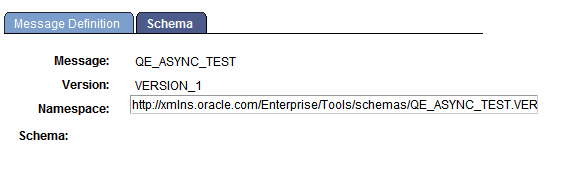
By default the Namespace field is populated with the namespace defined on the Service Configuration page, however you can change the namespace to use in the message schema as required.
To include a namespace in generated schema:
-
Access the Messages–Message Definition page ().
-
Select the Include Namespace check box.
-
Click the Schema tab.
The Messages–Schema page appears. By default the namespace as defined on the Service Configuration page populates the Namespace field.
-
In the Namespace field enter the namespace to use in the generated XML message schema.
-
Click the Message Definition tab.
-
Save your changes.
The system generates the message schema and includes the namespace specified.
Suppressing Empty XML Tags in Message Schema
PeopleSoft Integration Broker enables you to suppress empty XML tags in message schema of rowset-based messages.
The Messages-Message Definition page features a Suppress Empty XML Tags check box.
When you select this box, message schema generated for the message will not include any XML tags that contain empty or Null values.