Setting Security Details
The Security link at the Service level can be used to update the security for all defined methods of the Service.
The provider of the integration will define what security will be required to invoke their integration(s). This can be Basic Authentication, oAuth2 or no security at all. For each method (integration) the appropriate security can be set by selecting the Security link. The developer can then select the Authentication Option.
This example illustrates the fields and controls on the Security Details page. You can find definitions for the fields and controls later on this page.
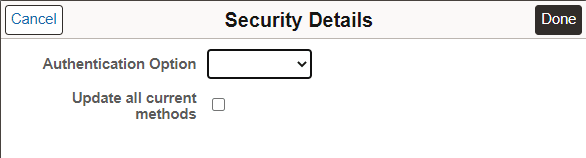
| Field or Control | Description |
|---|---|
|
Authentication Option |
Authentication Option are Basic Auth or oAuth2 |
|
Update all current methods |
Select this check box to propagate the security information to all the methods. |
Basic Authentication
This example illustrates the fields and controls on the Security Details page when Basic Auth is selected. You can find definitions for the fields and controls later on this page
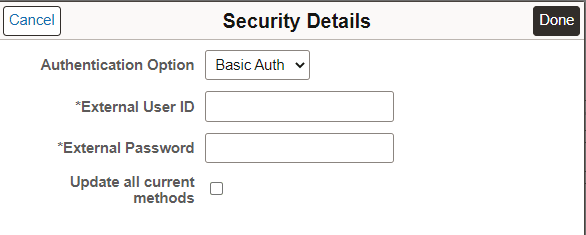
| Field or Control | Description |
|---|---|
|
Authentication Option |
Basic Authentication |
|
External User ID |
User ID |
|
External Password |
User ID password |
oAuth2
3rd party Authorization Service information should first be registered on the oAuth2 security pages see Security Administration: Creating a Service Application.
This example illustrates the fields and controls on the Security Details page when oAuth2 is selected. You can find definitions for the fields and controls later on this page.
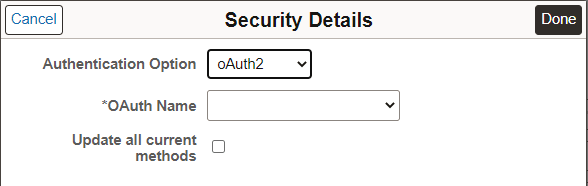
| Field or Control | Description |
|---|---|
|
Authorization Option |
oAuth2 |
|
OAuth Name |
Select the OAuth name from the drop down list. All registered Service Applications are available from the drop down list. |
|
Update all current methods |
Select this check box to propagate the security information to all the methods. |