Viewing Service Operation Definitions
The Service Operations component includes three pages:
| Field or Control | Description |
|---|---|
|
General Tab |
Features general-service and default-service operation information. |
|
Handlers Tab |
Provides summary information about handlers that have been added to an operation. Service operation handlers contain the programming logic for sending and receiving service operations and their contained messages, and for manipulating content. |
|
Routings Tab |
Provides summary information about service operations routings. Routing definition determine the direction—inbound, outbound or hub—of service operations. |
Viewing General Service Operation Information
When you access a service operation ( , the Service Operations - General page (IB_SERVICE) appears.
The top portion of this page contains basic information about a service operation, including its name, description, and so on. The Service Operation Security link opens the permission list for the service. Note that the Service Operation Security link appears only after a service operation definition is saved.
Note:
The Conditional Navigation control is reserved for future use.
The Runtime Schema Validation group box shows if runtime schema validation is selected for the request and response messages.
The Routing Status group box shows if any-to-local, local-to-local, or in the case of feeds, local-to-Atom, routing definitions have been generated for the service operation. Click the Routings tab to view detailed information about routing definitions that exist for a service operation.
The Routing Actions Upon Save group box shows the possible routings that the system can generate when the service operation definition is saved.
The Message Information section displays the request message, response message information, and fault message for the service operation. The View Message links in this section open the displayed message on the Message Definition page, where you can view additional information about the message. For messages defined for web services, all service operations with operation types other than Synchronous, the queue to which a message belongs also appears. Click the View Queue link or the Add New Queue link to open the Queue Definition page to view additional queue definition information or to add or change a queue to which a message belongs.
Viewing Handler Information
To view service operation handler information, click the Handlers tab. Doing so displays the Service Operations - Handlers page (IB_SERVICEHDLR) which lists summary information about handlers that have been added to an operation.
This example illustrates the Service Operations – Handlers page.
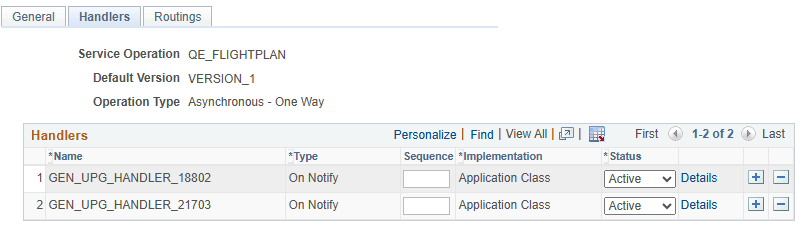
This example shows the Service Operations – Handlers page for an asynchronous service operation, QE_FLIGHTPLAN.
The summary information includes the handler name, the handler type, and the implementation method for the handler. The status of the handler, active or inactive, also appears.
Click the Details link to open the Handler Details page (IB_SERVICEHDLR_SEC) for the handler.
This example illustrates the Handler Details page.
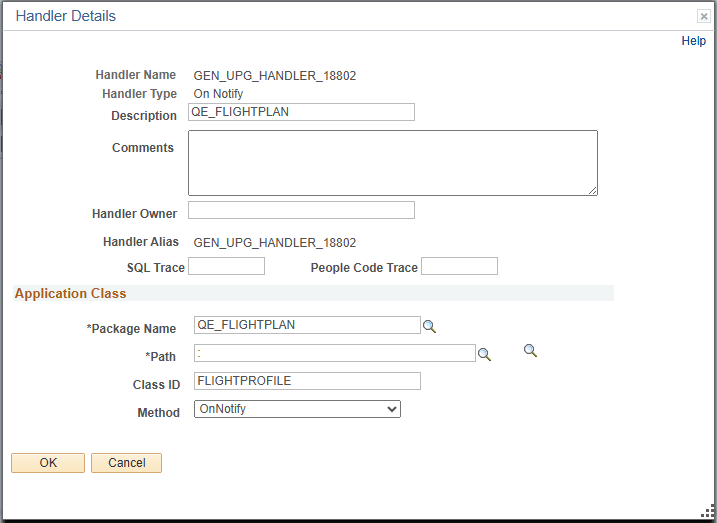
The Handler Details page provides the option to override SQL tracing or People Code tracing, or both, per Service Operation. Use the SQL Trace and People Code Trace fields to enter your desired level for SQL and PeopleCode trace respectively.
The Handler Details page shows additional information about the handler, including the owner and application class or component interface details.
You can also use this page to specify the handler details.
Viewing Routing Information
Click the Routings tab to open the Service Operations - Routings page (IB_SERVICERTNGS) to view a summary of routing definitions for an operation.
This example illustrates the Service Operations – Routings page.

The Routings Definition grid on the page lists summary information for routings that are defined for a service operation. Summary information that is displayed includes the routing definition name, service operation version, routing type, sending node, receiving node, direction of the routing and the routing status.
Click a routing definition name to open the routing in the Routing Definitions component, where you can view additional information about the routing.
See Viewing Routing Definitions in Graphical Format.
You can also use this page to add routing definitions to a service operation and to activate or deactivate routings for an operation.
See Adding Routing Definitions, Activating and Inactivating Routing Definitions.