Creating a List of Frequently Dialed Phone Numbers
Access the Shared Phone Book page using either of the following navigation paths, whichever is appropriate to you:
(if you are using the CTI server) or (if you are using a third-party routing server).
This example illustrates the fields and controls on the Shared Phone Book page. You can find definitions for the fields and controls later on this page.
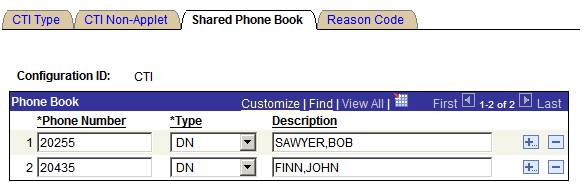
On this page, you can manage a list of frequently dialed phone numbers for a specific CTI configuration. These numbers appear when an agent connected to that CTI configuration selects the drop-down list box when dialing a number from the CTI Console. This saves the agents from manually entering any dialed numbers present in that CTI configuration when making outbound calls.
Note:
Phone lists are updated on the CTI Console only after the CTI Console launches. To refresh phone lists, refresh the browser and reactivate the console.
| Field or Control | Description |
|---|---|
|
Phone Number |
Enter a frequently dialed phone number to associate with this configuration. |
|
Type |
Select one of the following values:
|
|
Description |
Add a description for the telephone number. |