Entering Default Screen Pop-Up URL
The default URL provides a way to enable CTI screenpops if data from the voice task should not be used to construct the base of the pop-up URL. If the default URL is populated, then it will be used for the screenpop, even if sufficient user or call data is provided in a voice task to construct a URL.
Note:
User and Call data may be used as parameters to the URL.
Access the Miscellaneous page using the following navigation path:
Note:
This page is available through the CTI server only.
This example illustrates the fields and controls on the Miscellaneous page. You can find definitions for the fields and controls later on this page.
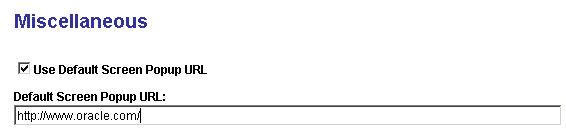
Set default screen pop-up URL parameters on the Miscellaneous page.
| Field or Control | Description |
|---|---|
|
Use Default Screen Popup URL |
Select if you want to set a default URL for the pop-up screen. The system uses the default method to determine what URL to use for the page launched for incoming calls. The system uses that default URL to examine the user data attached to that call. However, for customers who do not want to attach this user data to incoming calls, this option enables you to use the same URL for all pop-up screens. After selecting this option, enter the URL in the Default Screen Popup URL edit box. |
|
Default Screen Popup URL |
If the Use Default Screen Popup URL check box is selected, enter the value for the default URL. Note: To ensure that the user does not have to sign in to the pop-up window, the domain of the default URL must exactly match the domain of the sign-in URL. If the sign-in URL has no domain, the machine name of the default URL should be the same as the machine name of the sign-in URL. If either the domain or the machine name do not match, the system prompts the user for the user ID and password for the first pop-up screen. With Matching Domains: Within the same domain, such as example.com, the machine names can be different. For example: Signon URL: http://ntserver1.example.com/peoplesoft8/signon.html Default URL: http://uxserver2.example.com/servlets/iclientservlet/peoplesoft8/?ICType=PANEL&Menu=UTILITIES&Market=GBL&Component=MESSAGE_CATALOG1&Target=Main1&LANGUAGE_CD=ENG&MESSAGE_SET_NBR=1 Without Matching Domains: Without the matching domains, the machine name should be the same in both URLs. For example: Signon URL: http://ntserver1/peoplesoft8/signon.html Default URL: http://ntserver1/servlets/iclientservlet/peoplesoft8/?ICType=PANEL&Menu=UTILITIES&Market=GBL&Component=MESSAGE_CATALOG1&Target=Main1&LANGUAGE_CD=ENG&MESSAGE_SET_NBR=1 |
Related Topics