Defining REN Servers
Access the REN Server Configuration page using the following navigation path:
This example illustrates the fields and controls on the REN Server Configuration page. You can find definitions for the fields and controls later on this page.
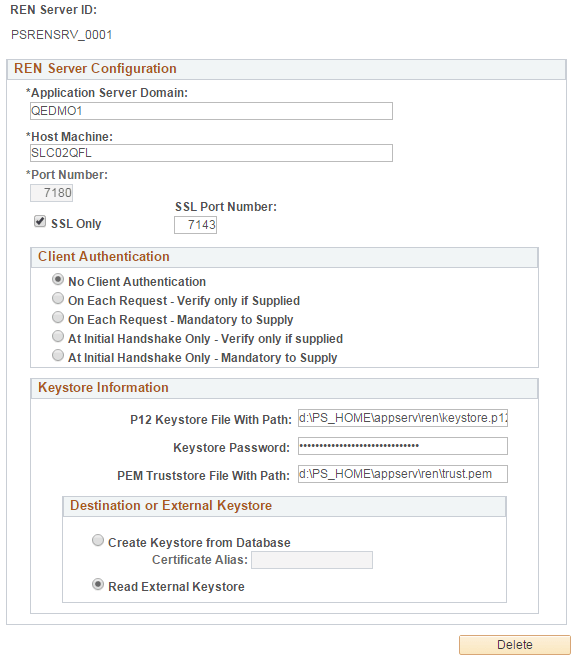
| Field or Control | Description |
|---|---|
|
Application Server Domain |
Enter the application server domain that is serving this REN server. |
|
Host Machine |
Enter the name of the host machine on which the specified application server domain runs. This entry requires
the host machine name, not its DNS name. However, the host machine
name may need to be fully qualified, for example, machineA.example.com.
On a Unix machine, determine the host name by running |
|
Port Number |
Enter the HTTP port number on which this REN server is addressed. Change the HTTP port value if multiple REN servers are running on the same host machine to avoid port conflicts. |
|
SSL Only |
Select to enable SSL on REN server. Note: If this option is selected, you must enter the SSL port. If you want to enable SSL on the REN server, ensure that you create and configure a Renserver certificate before defining a REN server. |
|
SSL Port Number |
Enter the HTTPS port number on which this SSL-enabled REN server is addressed. |
|
Client Authentication |
Select an option to determine the level of client authentication. Note: If the browser is configured for client authentication pop-up or the browser has more than one certificate configured, the SSL session ends if the user fails to provide the certificate within three heartbeats. To avoid such a session time-out, the user must either accept the client certificate within a heartbeat or increase the session time-out value in psrenconfig.txt. The Client Authentication values are described in a subsequent table. |
|
P12 Keystore File With Path |
Enter the absolute path where the PKCS #12 keystore will be created or is located. |
|
Keystore Password |
Enter a password for the internal or the external PKCS #12 keystore. The password is internally encrypted. |
|
PEM TrustStore File With Path |
Enter the absolute path where the TrustStore will be created or is located. Note: The trusted certificates are the root certificates, which are different from the certificate chain. |
|
Create Keystore from Database |
Select to use stored certificates from the Digital Certificates page. |
|
Certificate Alias |
Select a certificate alias to be used as a server certificate by the SSL-enabled REN server. Note: The certificate alias is stored in the PSKEYDB, PSCERTDB, and PSREN records. |
|
Read External Keystore |
Select to use an external PKCS #12 keystore to read the Private Key, the Certificate Chain, and the Trusted Certificates. If you want to use an external Java keystore, you must configure the external Java keystore before you define the REN server on this page. See Configuring External Keystore in REN Server Note: By default, the Read External Keystore radio button is not selected, that is, the application server, at boot up, reads the Private Key, the Certificate Chain, and the Trusted Certificates from the database and creates a PKCS #12 keystore at the location entered in the P12 Keystore File With Path field. Note: When you select the Read External Keystore radio button, the application server, at boot up, streams the path and password of the external PKCS #12 keystore to the REN server. The path of the external keystore is entered in the P12 Keystore File With Path field and the password is entered in the Keystore Password field. Subsequently, the REN server, at boot up, loads the external PKCS #12 keystore by using the password. |
The following table shows the client authentication values:
| Parameter | Flag Value | Description |
|---|---|---|
|
No Client Authentication |
0 |
Client authentication is disabled. |
|
On each Request-Verify only if Supplied |
1 |
Client authentication is enabled The server sends a client certificate request to the client. Verification happens only if the certificate is provided. If the verification process fails, the TLS/SSL handshake is immediately terminated. If the client does not return any certificate, SSL communication still continues |
|
On Each Request-Mandatory to Supply |
3 |
Client authentication is enabled and mandates that the client provide the certificate. If the client does not return a certificate, the TLS/SSL handshake is immediately terminated with a handshake failure alert. If the client returns a certificate, it is verified. The communication fails if the verification fails. |
|
At Initial handshake Only-Verify only if Supplied |
5 |
Client authentication is enabled and requests a client certificate on the initial TLS/SSL handshake only. Verification happens only if the certificate is provided. If the client does not provide any certificate, SSL communication still continues. If verification fails, the TLS/SSL handshake is immediately terminated. |
|
At Initial handshake Only-Mandatory to Supply |
7 |
Client authentication is enabled and mandates that the client provide the certificate only in initial TLS/SSL handshake. |