Using PeopleCode Broadcast
Access the PCodeBroadcast page using the following navigation path:
This example illustrates the fields and controls on the PCodeBroadcast page. You can find definitions for the fields and controls later on this page.
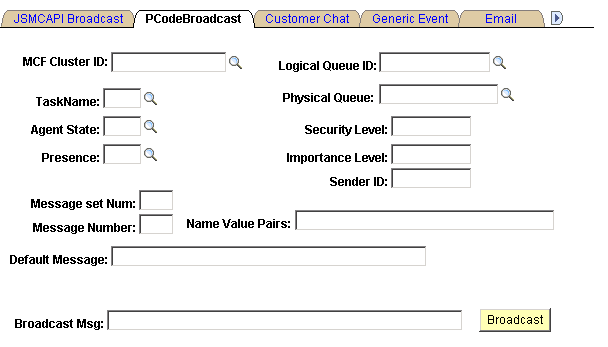
| Field or Control | Description |
|---|---|
|
MCF Cluster ID |
Select the target cluster receiving the broadcast message. |
|
Logical Queue ID |
Select the name of the target logical queue. |
|
Physical Queue ID |
Select the name of the target physical queue. |
|
TaskName |
Select the task. Select from email, chat, voice, generic or none. |
|
Agent State |
Select the state of the agent. Note: The agent receives the broadcast message only if the agent is logged in. |
|
Presence |
Select the presence. Note: If the agent is logged out, the presence should be inActive. All agents who are currently logged in receive the broadcast message. |
|
Message Set Number |
Select the message set number if you want to broadcast a message from the Message Catalog. |
|
Message Number |
Select the message number in the message set. |
|
Default Message |
Enter the default message. If no message is found in Message Catalog with the preceding message number, the text of the default message is used for the broadcast instead. |
|
Security Level |
(Optional) Enter the security level. |
|
Importance Level |
(Optional) Enter the importance level. |
|
Sender Id |
Enter the sender ID if you want the sender that is displayed with the notification to be an ID other than the one that sent the broadcast. |
|
Message |
Enter the message that you want to broadcast. Note: To view the broadcast message that is sent by the supervisor, use the Agent console sample page. Select the same REN cluster as used by the supervisor to broadcast, and the broadcast message is displayed on the Agent console. |
|
NameValue Pairs |
Enter the name and value pairs to configure your data. Note: These name-value pairs are concatenated as a string. You can define any name-value parameters for your application and send them in the name-value pair string. The JSMCAPI passes the same as a string to the console. Your particular application needs to process that string accordingly |
Note:
For a system-wide PeopleCode Broadcast, the broadcast message from the supervisor is sent to all agents, as well as the supervisors on all active REN clusters.
For a cluster-wide PeopleCode Broadcast, the broadcast message from the supervisor is sent to all agents, as well as the supervisors on the specified REN clusters.
For a queue-wide broadcast, the broadcast message from the supervisor is sent to all agents who are currently logged in to the queue that is specified by the queue ID in all clusters if the MCF cluster ID is not specified. If the cluster ID is specified, all agents that are logged into the queue that is specified by the queue ID in the cluster that is specified by the cluster ID receive the broadcast message.
For agent-wide broadcast, if both the cluster ID and queue ID are specified, the broadcast message is sent to all agents that are currently logged into the queue that is specified by the queue ID. This assumes that the queue is in the cluster that is specified by the cluster ID. However, if only the cluster ID is mentioned, all agents that are logged and active on any queue on that cluster receive the broadcast message.
The following table describes the combinations:
| Type of Broadcast | Cluster | Queue | Agent Login State | Agent Activity State | Broadcast Audience and Description |
|---|---|---|---|---|---|
|
PeopleCode |
Not specified |
Not specified |
Not specified |
Not specified |
This is a true system-wide broadcast. All agents on all active REN clusters receive the broadcast. |
|
PeopleCode |
Cluster_1 |
Not specified |
Not specified |
Not specified |
All agents on Cluster_1 receive the broadcast. |
|
PeopleCode |
Cluster_1 |
SALES |
Not specified |
Not specified |
All agents subscribing to SALES receive the broadcast. This assumes that SALES is on Cluster_1. |
|
PeopleCode |
Not specified |
SALES |
Logged |
Not specified |
All agents that are logged (active and inactive) to SALES (all clusters with physical queues that are associated with SALES) receive the broadcast. |
|
PeopleCode |
Cluster_1 |
SALES |
Logged |
Active |
All agents that are logged into SALES and are in active state receive the broadcast. This assumes that SALES is on Cluster_1. |
|
PeopleCode |
Cluster_1 |
Not specified |
Logged |
Active |
All agents that are logged and active on any queue on Cluster_1 receive the broadcast. |
|
PeopleCode |
Cluster_1 |
Not specified |
Not specified |
Active |
All agents that are logged and active on any queue on Cluster_1 receive the broadcast. This is the same as the preceding because only agents that are logged in can be active. |
Related Topics