Formatting Options
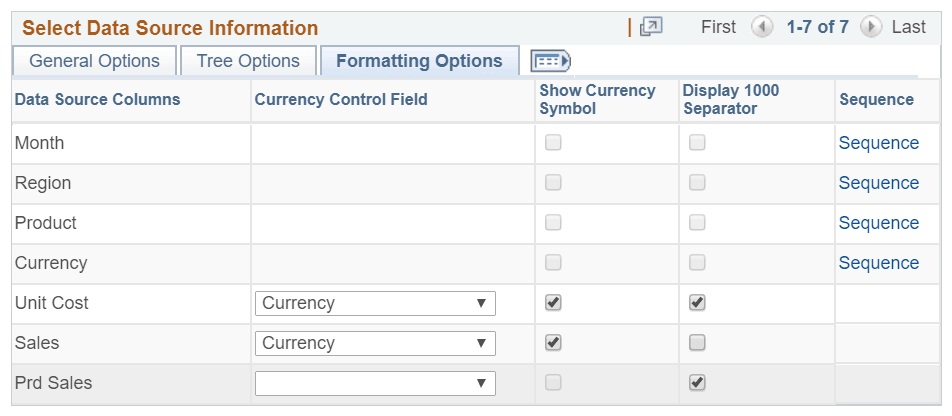
This example illustrates the fields and controls on the Formatting Options section. You can find definitions for the fields and controls later on this page.
| Field or Control | Description |
|---|---|
|
Currency Control Field |
Select Currency field as the Currency Control Field. The decimal positions for the currency value are based on the currency control field. For example, two decimal positions appear for U.S. dollars or three decimal positions appear for the Brazilian real. Note: The query should include the Currency field as a Data Source Column to associate it as the Currency Control Field. These currency control fields can be associated with the columns set to Value and Display. |
|
Show Currency Symbol |
Select this option to display the currency symbol for the columns that are set to Value. If this option is selected:
Note: This option is accessible only when the Currency option is selected in the Currency Control Field. |
|
Display 1000 Separator |
Select to display the 1000 separator for the Value. For example, the value of ten thousand dollars appears as $10,000.00 and Product Count appears as 1,000. |
|
Sequence |
Click to access the Configure Column Axis Sequence page. Use this page to define order or sequence for values of axis fields. |
Note:
If no value is set in the Formatting Options tab, the system displays the currency values using the default settings, for example, 123456.78.
The alternate text in the chart and in the values on the Detail View displays the currency in the defined formats.
Defining Sequence for Values of Axis Fields
Click the Sequence link in the Formatting Options section to access the Configure Column Axis Sequence page. Use this page to define order or sequence for values of axis fields.
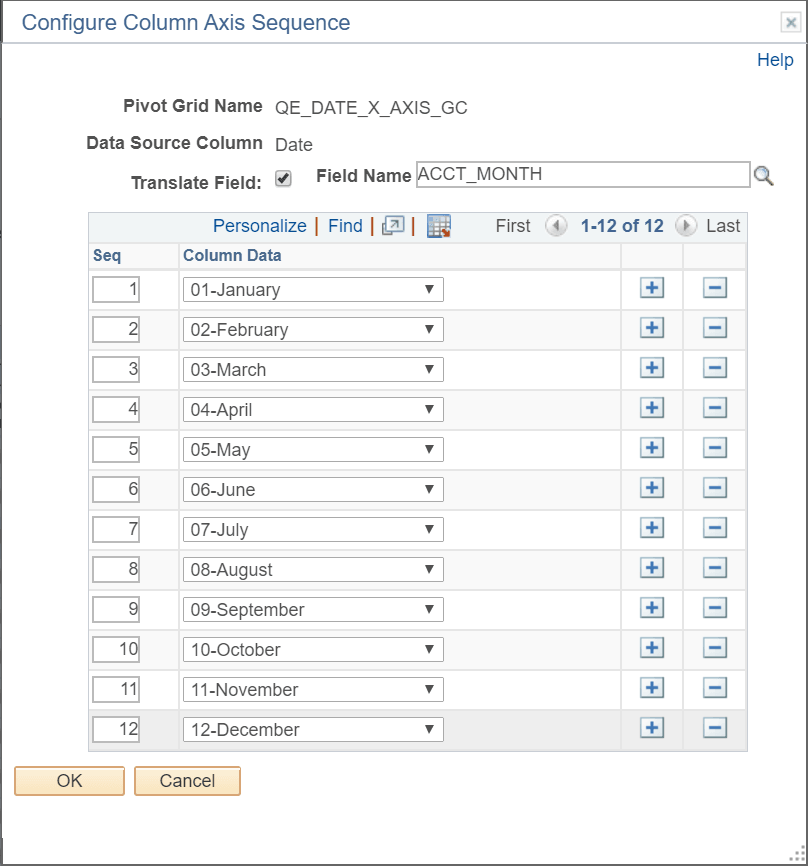
This example illustrates the fields and controls on the Configure Column Axis Sequence page. You can find definitions for the fields and controls later on this page.
| Field or Control | Description |
|---|---|
|
Translate Field |
Select this check box to use a field with translate values as the Field Name. Correspondingly, a drop-down list with translate values of the Translate Field appears in the Column Data field. |
|
Field Name |
This field is enabled only when the Translate Field check box is checked. Select a value for the Field Name to activate a dropdown list with translate values of the Translate Field in the Column Data field. |
|
Seq |
Define order or sequence for values of axis fields. |
|
Column Data |
Enter data for the axis field. The Column Data field can either be a dropdown list with translate values of the Translate Field if the Translate Field is checked and the Field Name is provided, or a text box where data for axis field can be entered. |