Personalizing Unified Related Content Analytics Pane
The Personalize Related Information button gives you the option to display or hide related information and analytics. It also allows you to sequence and reorder analytics as well as related content. You can also delete an analytic and display the analytic as a tile or a link.
Personalize Unified Related Content Analytics - Order Items tab
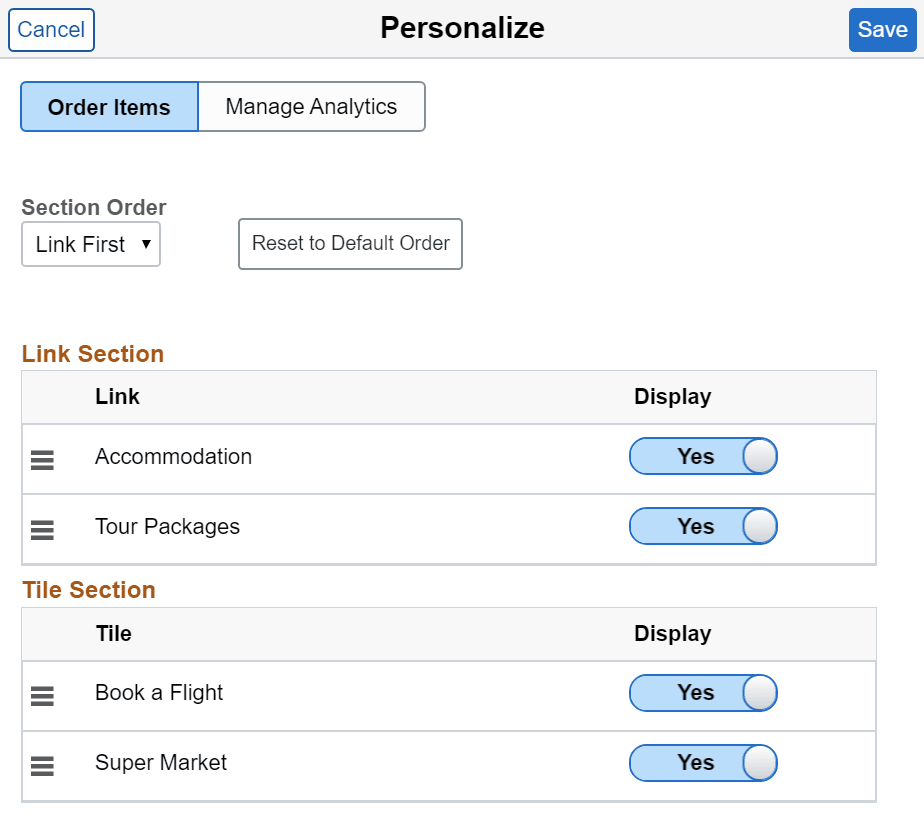
Use the Personalize Unified Related Content Analytics - Order Items tab to set the order and properties of items in your simplified analytics and related content.
The example illustrates the Order Items tab in the Personalize dialog box. The fields and controls are listed further.
| Field or Control | Description |
|---|---|
|
Section Order |
Use this option to select whether to display the links section or the tiles section first. |
|
Reset to Default Order |
Click to reset the entire Related Information pane to its defaults. In the default settings:
|
|
Link Section |
Displays simplified analytics only. By default all analytics are shown as links. Drag and drop to reorder the simplified analytics within the grid. |
|
Tile Section |
Displays related content and the simplified analytics that are displayed as tile. Drag and drop to reorder the simplified analytics and related content within the grid. Note: Sequencing in this window overrides the sequence numbers set in the Manage Related Content Configuration page. |
|
Display |
Use this option to select if the simplified analytic or related content should be displayed in the Unified Related Content Analytics Pane. |
Personalize Unified Related Content Analytics - Manage Analytics tab
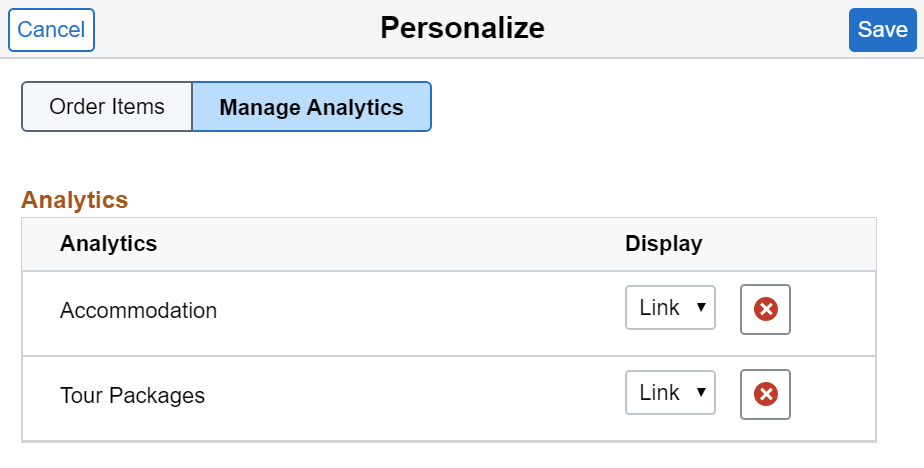
Use the Personalize Unified Related Content Analytics - Manage Analytics tab to manage your analytics separately from related content.
The example displays the Manage Analytics tab in the Personalize dialog box. The fields and controls are listed further.
| Field or Control | Description |
|---|---|
|
Analytic |
Displays the simplified analytics. |
|
Display |
Select the Link or Tile option to display analytics as either tiles or links. These changes are reflected when you return to the Order Items tab. |
|
|
Delete analytics. Note: Delete button will not appear for the analytics, for which the user doesn’t have delete permissions. |
