Adding a Link
Access the Add Link page. (Click the Add Link button on the Maintain Collection page.)
This example illustrates the fields and controls on the Add Link page. You can find definitions for the fields and controls later on this page.
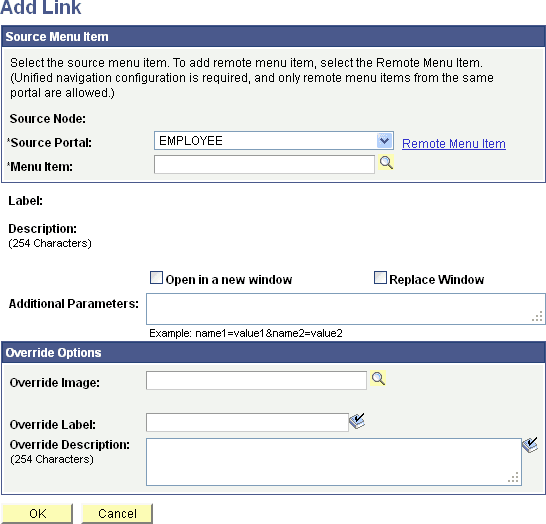
| Field or Control | Description |
|---|---|
|
Source Node |
Displays the name of the remote source node if a remote menu item has been selected. |
|
Source Portal |
Select the portal registry from which you want to select a content reference. The current portal is selected by default. Available source portal values include all portals defined in the PeopleSoft databases, as well as a special Local Portal value. The Local Portal option is useful for cases in which a navigation collection will be copied between portals, and the content reference that you are defining should automatically refer to the current portal. See Administering Portal Definitions. Note: For remote menu items, the Source Portal defaults to the current portal and is read only. |
|
Menu Item |
Select a local content reference to add this link to the navigation collection. Click the Browse Portal Registry button to access the Select Source Link page, where you can view a graphical display of the selected portal registry and select the content reference that you want to add. Note: You can use this option to add a published navigation page to the navigation collection that you are creating. |
|
Remote Menu Item |
Select a remote component-based content reference to add to the navigation collection from the Select a Content Reference page. |
|
Label |
Displays the existing menu content reference label text, but you can override this default using the Override Label field. This text appears as link text for the content reference on the Maintain Collection page, as well as on the navigation collection publication. |
|
Description |
Displays the existing description text, but you can override the default using the Override Description field. This description text appears when the mouse cursor is moved over the content reference link. |
|
Open in a new window |
Select to open the page in a new browser window. This option and Replace Window are mutually exclusive. |
|
Replace Window |
Select to replace the current browser window, including navigation and target area, with the new content. Replace window updates the template and navigation to display the template and navigation of the target content reference. This option and Open in new window are mutually exclusive. |
|
Additional Parameters |
Define additional query parameters that are appended to the uniform resource locator (URL) used to access the content reference. Defining these query parameters here eliminates the need to register the same content reference multiple times with different parameters. For example, you can use these additional parameters to point users to a specific row of data on an application business transaction page. The query string parameter can be the search record field name = field value. These query parameters are stored as attributes with the content reference and are applied to the URL at runtime. |
Override Options
| Field or Control | Description |
|---|---|
|
Override Image |
Select the image to display as the large image for the content reference. If a default content image has been defined at the system or registry level, the selected image overrides the default. This large image appears for the content reference on the navigation collection publication. |
|
Override Label |
Enter a label to override label text in the Label field. If you override label text, changes to label text on the source reference are not reflected on the navigation collection publication. If you want source reference changes to be reflected on the navigation collection publication, do not enter override text in this field. |
|
Override Description |
Enter a description to override description text in the Description field. If you override description text, changes to description text on the source reference are not reflected on the navigation collection publication. If you want source reference changes to be reflected on the navigation collection publication, do not enter override text in this field. |
|
Find Source |
This link appears for users who can access the Structure and Content pages once a Source Link value has been selected. Select to access the Content Ref Administration page, where you can view content reference details, such as security, image attributes, valid to date and from date, and content provider for the selected source content reference. |