Associating Approvals with Action Item
Use the Action Item AWE Configurations page to associate approvals with action item and specify application package class and methods that should run when the AWE process is approved or denied.
Navigation:
Click the Configure AWE link on the Service Configuration tab of the Action Item Details grid.
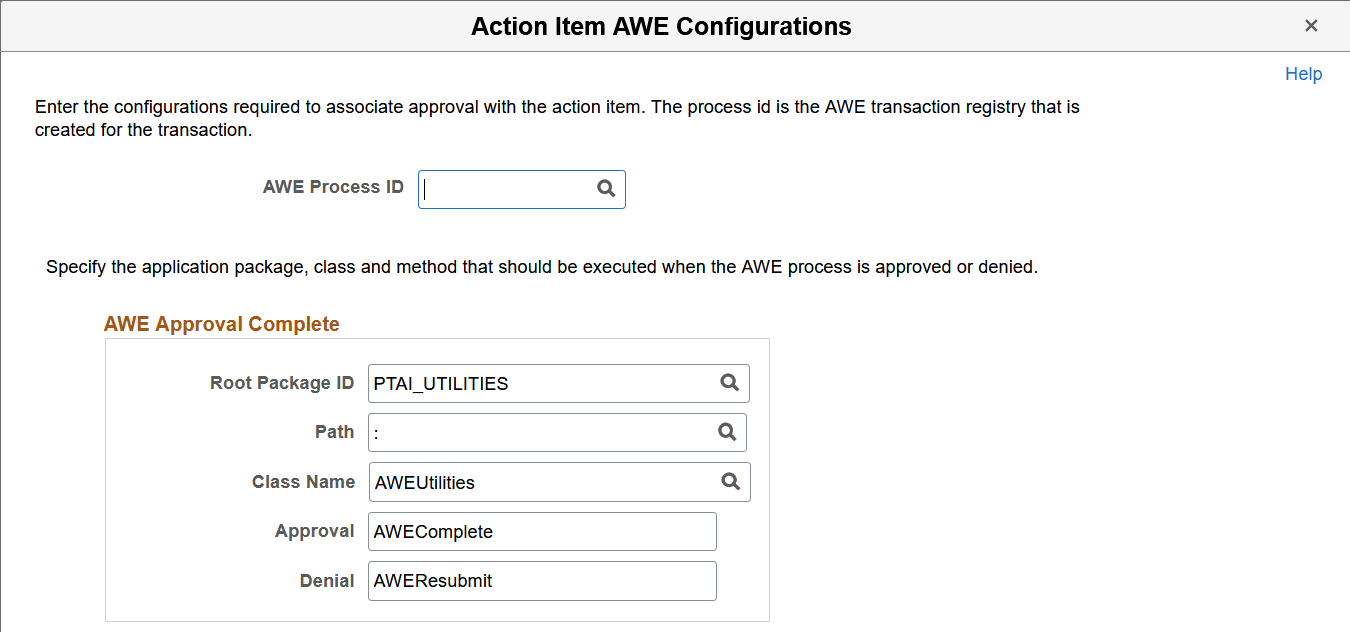
This example illustrates the fields and controls on the Action Item AWE Configurations page. You can find definitions for the fields and controls later on this page.
| Field or Control | Description |
|---|---|
|
AWE Process ID |
Select an existing process ID from the AWE transaction registry that is created for this transaction. |
|
Root Package ID |
Select or enter the name of the application package that you want to use for the AWE process. |
|
Path |
Enter the names of each subpackage in the application class hierarchy that define the location of the application class. Separate subpackage names by a colon. If the class is defined in the top-level application package, enter or select the colon. |
|
Class Name |
Select or enter the name of the application class that you want to use for the AWE process. |
|
Approval |
Select or enter the name of the method that you want to use when workflow is approved. |
|
Denial |
Select or enter the name of the method that you want to use when workflow is not approved. |