Configuring Additional Context Data
Use the Action Item Context Data page to define service parameters for the related content service.
Navigation:
Click the Configure Context Data link on the Service Configuration tab of the Action Item Details grid.
Context data that is defined as a key field at the template (or instance) level is automatically passed to each related content service. However, an activity guide definition can include additional non-key context data. Use the Action Item Context Data page to map these additional context data fields to related content service parameters as needed on a per action item basis.
In addition, for activity guides defined as a single unit of work, one or more output parameters defined for one action item can serve as the input parameters to subsequent action items.
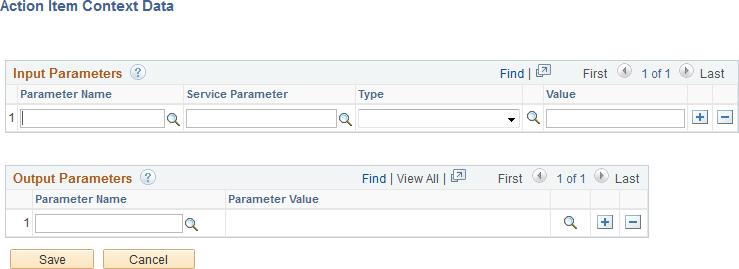
This example illustrates the fields and controls on the Action Item Context Data page. You can find definitions for the fields and controls later on this page.
Input Parameters
Map additional non-key, context data fields to related content service parameters as needed on a per action item basis. In addition to non-key context data fields, you can select from output parameters defined on predecessor steps. At runtime, the values of the action item input parameters are passed to the associated related content service.
| Field or Control | Description |
|---|---|
|
Parameter Name |
Specify the parameter name in one of two ways:
|
|
Service Parameter |
Select the service parameter (typically, a component key) for the related content service. |
|
Type |
Select one of the following context types:
|
|
Value |
Enter the value when the context type is fixed value. Alternatively, select the system variable from the look up list when the context type is system variable. Note: No value is entered when the context type is runtime. |
Output Parameters
Note:
The Output Parameters section is displayed only when the activity guide is defined as a single unit of work.
Select one or more page field to serve as output parameters for this action item. The values of the selected page fields are available to subsequent action items as input parameters.
| Field or Control | Description |
|---|---|
|
Parameter Name |
Select the page field name to serve as an output parameter. |