Configuring Remote Client Directives
Access the Remote Client page. (Select Select the Remote Client page tab.)
This example illustrates the fields and controls on the Web Profile Configuration - Remote Client page. You can find definitions for the fields and controls later on this page.
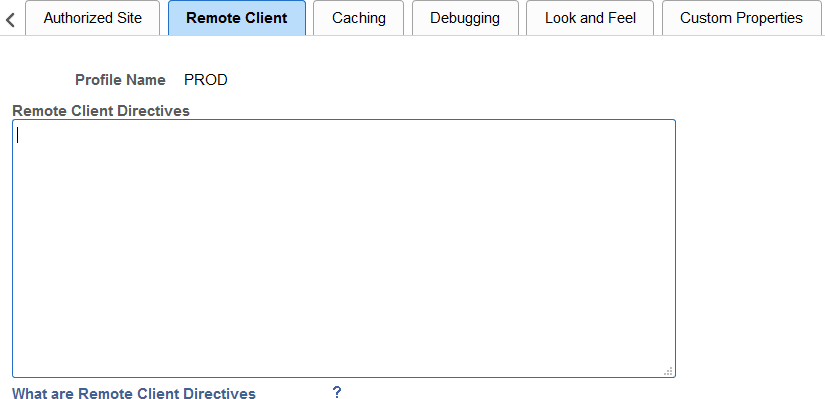
Use the Remote Client page to define directives used by the PeopleSoft system to identify and log remote client addresses.
When a remote client makes a request to a PeopleSoft system, it is rare that the remote client connects directly to the PeopleSoft system. Instead, multiple intermediate machines such as firewalls, proxy servers, load balancers, routers, and so on handle the request on behalf of the actual remote client. Any of these machines may forward the request after putting their own address in place of the actual remote client’s address. When this address substitution takes places, then that network machine must put the actual remote client address elsewhere in the packet usually in an HTTP request header. If it does not do this, then the actual remote client address is lost to downstream hosts. When this occurs, the address recorded by the PeopleSoft system is the HTTP request’s last hop, which is frequently a load balancer, reverse proxy server, or other box within your intranet.
The Remote Client page allows you to configure your PeopleSoft web server with directives that will allow it to more accurately identify and log the actual remote client address from the requests that it receives. These directives include:
-
RemoteIPHeader – Identifies which HTTP request header is used by the systems in your internal networks.
-
RemoteIPSeparator – Identifies the character used to separate addresses appended to the HTTP request header.
-
TrustedProxies – Identifies the list of machines on your internal, controlled networks through which inbound requests can pass.
-
RemoteClientFormat – Identifies the format (IP address or DNS name) to be recorded and reported by the PeopleSoft system.
Each of these directives is discussed in more detail in the following sections.
While these directives can help the PeopleSoft system more accurately identify and consistently report remote client access, much depends on the network outside of the PeopleSoft system. For example, consistency in the configuration of your internal network and how each machine forwards remote client information is key. But other aspects are out of your control. For example, if the actual remote client is on its own intranet that has a firewall or gateway server that connects to the internet, then the address of the remote gateway is effectively the remote client address. Addresses and forwarding headers included by other upstream systems outside of your control are deemed untrusted by the PeopleSoft system, even if those addresses and headers are forwarded by your network intact.
The following example illustrates how the effective remote client address of the remote gateway is recorded by the PeopleSoft system rather than the actual remote client address. Each system that forwards a request appends the address of the machine that contacted it to the HTTP request header—in this example, the X-Forwarded-For header.
The following example illustrates how the effective remote client address of the remote gateway is recorded by the PeopleSoft system rather than the actual remote client address. Each system that forwards a request appends the address of the machine that contacted it to the HTTP request header—in this example, the X-Forwarded-For header.
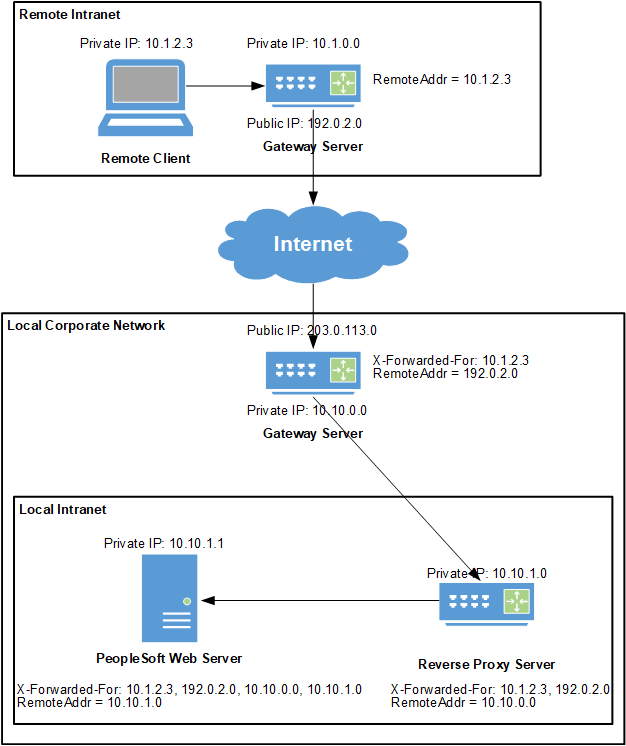
For the purposes of this example, the remote client directives have been configured as follows:
# An example of remote client directives
RemoteIPHeader = X-Forwarded-For
RemoteIPSeparator = ,
TrustedProxies = 10.10.0.0 10.10.1.0
RemoteClientFormat = c-ip
After the PeopleSoft web server appends the remote address of the previous hop, the HTTP request header that the PeopleSoft system processes includes:
X-Forwarded-For: 10.1.2.3, 192.0.2.0, 10.10.0.0, 10.10.1.0When the PeopleSoft web server processes this request header, it reads it from right to left stripping off known trusted hosts. In this case, 10.10.1.0 and 10.10.0.0 are the addresses of trusted hosts, so they are stripped off. The next address, 192.0.2.0 is unknown to the PeopleSoft web server because it is not listed as a trusted host. Processing of the request header stops, and this is the remote client address that is logged and reported by the PeopleSoft system. In reality, it is not the actual remote client address (10.1.2.3), but the effective remote client address for the remote gateway instead. Because the c-ip directive is in effect, the address is reported and logged as an IP address, and no reverse DNS lookup is attempted.
General Considerations
Note the following considerations when specifying directives:
-
All directives are optional.
-
Directive names are not case sensitive.
-
Each directive fits on one line.
-
Except for the TrustedProxies directive, only one value for a directive is allowed. If a directive is specified more than once, the last value specified is in effect.
-
The general format is Directive Name = value, in which = is used to separate the directive's name and its value.
-
A # marks the beginning of a comment. All text from the # through the end of line is ignored.
RemoteIPHeader
This directive specifies the HTTP request header to be used by your controlled corporate network. If this directive is omitted, then evaluation of the remote client as described in this section is disabled.
For example:
RemoteIPHeader = X-Forwarded-ForDefault value: none
RemoteIPSeparator
This directive specifies the single character that separates the IP addresses in the HTTP request header that are appended by the trusted hosts in your controlled corporate network.
For example:
RemoteIPSeparator = ;Default value: space character
TrustedProxies
Each address in this list identifies a trusted host in your controlled corporate network through which inbound HTTP requests may have passed. Each address in the list is an IPv4 or IPv6 formatted address or a host name that can be resolved to an IP address (or addresses). Internally, PeopleSoft resolves all these addresses into a single list of IP addresses. Multiple directives with this name are allowed. Therefore, subsequent TrustedProxies directives append additional values to those from prior directives.
When using this directive, separate trusted hosts with a space. For example:
TrustedProxies = 10.1.1.1 10.2.1.1 proxy1.example.com 192.168.1.1Default value: none
RemoteClientFormat
This directive specifies whether the PeopleSoft system logs and reports the remote client using its IP address or its host name. Legal values are c-ip or c-dns and are case insensitive. All other values cause the directive to be ignored. This directive, or its default value when omitted, is enabled regardless of the presence or absence of the RemoteIPHeader directive.
Note:
If the DNS resolver contacted by the PeopleSoft system cannot resolve the DNS name of the remote client, then even when this directive is set to c-dns, the address logged and reported by the PeopleSoft system will be an IP address.
For example:
RemoteClientFormat = c-dnsDefault value: c-ip