Creating Application Class Service Definitions
On the Define Related Content Service page, select the Application Class URL type.
This example illustrates some of the fields and controls on the Define Related Content Service page for an application class. You can find definitions for some of the fields and controls later on this page.
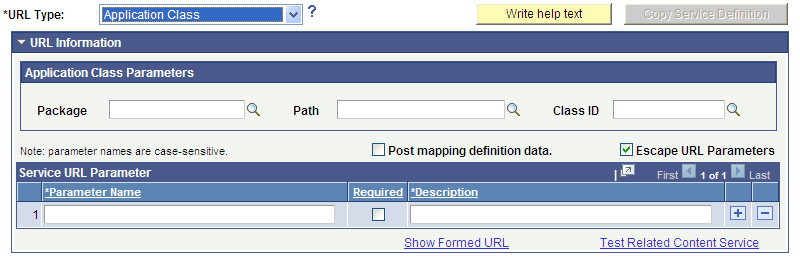
Application Class Parameters
| Field or Control | Description |
|---|---|
|
Package |
Enter the name of the application class package that you want to use to define the related content service. |
|
Path |
Enter the names of each subpackage in the application class hierarchy that define the location of the application class that defines the service. Separate subpackage names by a colon. If the class is defined in the top-level application package, enter or select the colon. |
|
Class ID |
Enter the name of the application class that defines the related content service. The class must exist in the application package and subpackage that you specify. |
These fields are validated when you save the definition; the application does not allow you to save the service if you enter an invalid application class.
Service URL Parameters
Application class service definitions do not require service URL parameters except when you want to map field-level data to the service and display the service in a field-level contextual menu.
Application class URLs cannot be formed by clicking the Show Formed URL link because the URL is dynamically generated by PeopleCode using data in the buffer. For the same reason, application class URLs cannot be tested by clicking the Test Related Content Service link.
Simple Application Class PeopleCode Example
An application class that will be used to define a related content service must import and extend the PT_RCF:ServiceInterface class. In addition, it must define a single method named execute.
This is an example of application class PeopleCode that could be used to create an application class service for use as a related action:
import PT_RCF:ServiceInterface;
class res_det implements PT_RCF:ServiceInterface
   method execute();
end-class;

Global number &PRL_Schedule_Current_Row;

method execute
   /* Extends/implements PT_RCF:ServiceInterface.execute */
   Evaluate %Component
      When = Component.PGM_RESOURCE_LIST

/*******************************************************************
  Transfer to the Resource detail page.
*******************************************************************/
         If (%Page = Page.PC_PRL) Then
            GetPage(Page.PC_PRL_SCHED).Visible = True;
            &PRL_Schedule_Current_Row = CurrentRowNumber();
          /*AN: Hide the grids if the resource is not a resource class */
            If (GetRow().PROJECT_TEAM.TEAM_MEMBER_CLASS.Value <> "L") Then
               GetRow().GetRowset(Scroll.PROJ_TEAM_SCHED).HideAllRows();
               GetRow().GetRowset(Scroll.PC_TEAM_IP_SCHD).HideAllRows();
            Else
               Local Rowset &ipRowSet = GetRow().GetRowset(Scroll.PC_TEAM_IP_SCHD);
               If (&ipRowSet.ActiveRowCount > 1 Or
                  (&ipRowSet.ActiveRowCount = 1 And
                     All(&ipRowSet(1).PC_TEAM_IP_SCHD.START_DT.Value))) Then
                  GetRow().GetRowset(Scroll.PC_TEAM_IP_SCHD).ShowAllRows();
               Else
                  GetRow().GetRowset(Scroll.PC_TEAM_IP_SCHD).HideAllRows();
               End-If;
            End-If;
            Local Rowset &arlResDtlVw = GetRow().GetRowset(Scroll.PC_ARL_RESDTLVW);
            &arlResDtlVw.Flush();
            &arlResDtlVw.Select(Record.PC_ARL_RESDTLVW, "where BUSINESS_UNIT = :1 AND PROJECT_ID = :2 AND TEAM_MEMBER = :3 and TEAM_MEMBER_CLASS = :4 and TEAM_MEMBER_IND = :5 ", PROJECT.BUSINESS_UNIT, PROJECT.PROJECT_ID, GetRow().PROJECT_TEAM.TEAM_MEMBER.Value, GetRow().PROJECT_TEAM.TEAM_MEMBER_CLASS.Value, GetRow().PROJECT_TEAM.TEAM_MEMBER_IND.Value);
            TransferPage(Page.PC_PRL_SCHED);
         End-If;
            /*AN: Hide the grids if the resource is not a resource class */

         If (&teamRow.PROJECT_TEAM.TEAM_MEMBER_CLASS.Value <> "L") Then
            &teamRow.GetRowset(Scroll.PROJ_TEAM_SCHED).HideAllRows();
            &teamRow.GetRowset(Scroll.PC_TEAM_IP_SCHD).HideAllRows();
         Else
            Local Rowset &ipSet = &teamRow.GetRowset(Scroll.PC_TEAM_IP_SCHD);
            If (&ipSet.ActiveRowCount > 1 Or
               (&ipSet.ActiveRowCount = 1 And
                  All(&ipSet(1).PC_TEAM_IP_SCHD.START_DT.Value))) Then
                  &teamRow.GetRowset(Scroll.PC_TEAM_IP_SCHD).ShowAllRows();
            Else
               &teamRow.GetRowset(Scroll.PC_TEAM_IP_SCHD).HideAllRows();
            End-If;
         End-If;
            TransferPage(Page.PC_PRL_SCHED);
         End-If;

   End-Evaluate;

end-method;
Creating Application Class Service Definitions for Event Mapping
To create and configure application class-based service definitions specifically for event mapping, use the event mapping pages instead.