Define Related Content Service Page
Use the Define Related Content Service page to create and manage service definitions.
Navigation:
This example illustrates the fields and controls on the Define Related Content Service page. You can find definitions for the fields and controls later on this page.
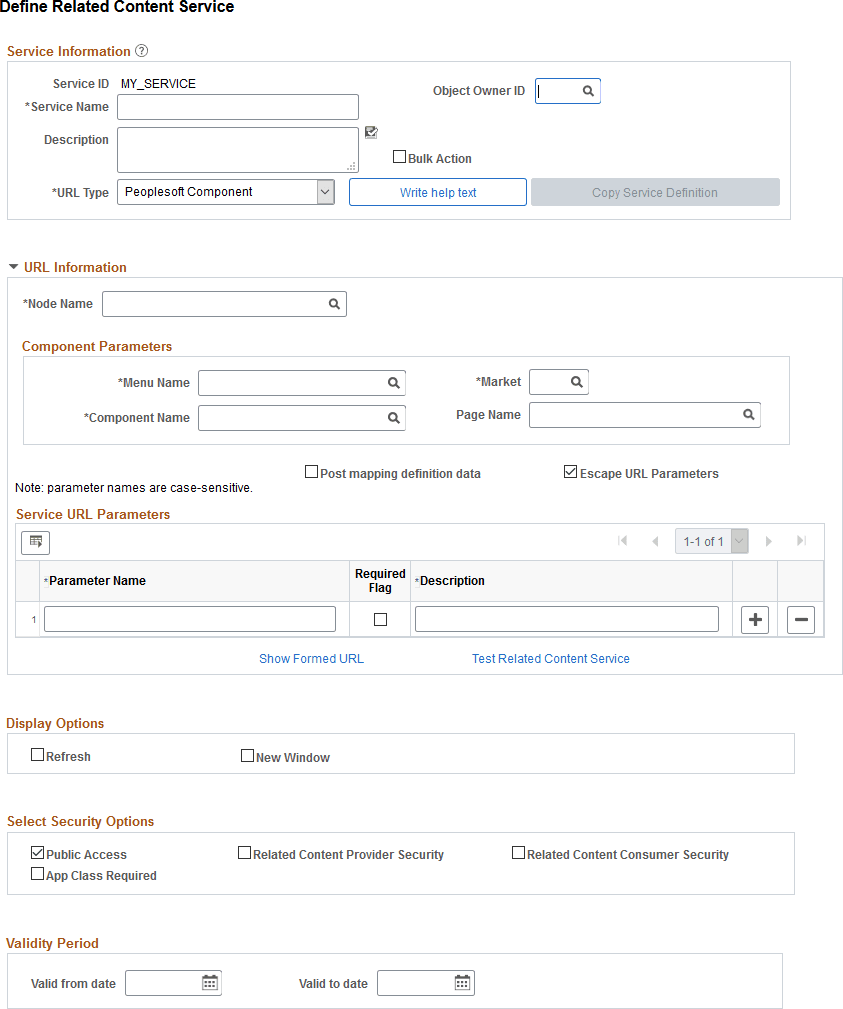
This section describes the common elements used in defining related content services. The elements appear in the lists in the order that they appear on the page.
Related Content Service
This table describes fields that are common to all service URL types.
| Field or Control | Description |
|---|---|
|
Service ID |
Specifies the unique identifier of the service definition. |
|
Service Name |
Enter a short name for the service, which will be used as the default label for the service when it is assigned as related content. |
|
Object Owner ID |
Select which product, feature, or application owns this service definition. |
|
Description |
Enter a description for the related content service. |
|
Bulk Action |
Select this option to enable the service to execute a related action on multiple rows of data. If the Bulk Action option is not selected, users execute the related action on a single row of data at a time. The Bulk Action option is available for the following URL types:
See Selecting Bulk Action for Related Content Service Definitions. |
|
Template |
Select this option to create a master template for template-based services. Note: This option is available only when the service URL type is Application Class. |
|
URL Type |
Select from nine service types that build the URL that defines the location and parameters of the service:
|
|
Write help text |
Click to open a help text page where you can create instructions that are specific to assigning this related content service and mapping its service parameters. A subject matter expert can access the help text for assistance when configuring a related content assignment. See Writing Help Text for Related Content Service Definitions. |
|
Copy Service Definition |
Click to clone the service definition and its parameters. |
URL Information
This table describes URL information fields. These fields are common to several or all service URL types.
| Field or Control | Description |
|---|---|
|
Node Name |
Enter the node name of the PeopleSoft system where the service resides. If the service resides in the same PeopleSoft system, the node name will be either LOCAL_NODE or any default local node of the PeopleSoft system. |
|
Populate parameters |
Supplies the service parameters in the Service URL parameter grid based on the URL type. This button appears for embeddable pagelet, OBIEE pagelet, and PeopleSoft Query service types only. Note: For embeddable and OBIEE pagelets, only context-sensitive parameters are supplied. For query services, only prompt fields are populated. |
|
Show Formed URL |
Click to display the entire formed URL with test parameter values in a display-only edit box beneath the Service URL Parameter grid. Note: Application class URLs cannot be formed by means of this link because the URL is dynamically generated by PeopleCode using data in the buffer. |
|
Formed URL |
This field appears only after you click the Show Formed URL link. The formed URL appears within a display-only edit box. |
|
Test Related Content Service |
Click to test the related content service in a new window. The Test Related Content Service page appears enabling you to enter a parameter value and test the functionality of the service. |
Display Options
This table describes display option fields. Display options apply only when the subject matter expert configures the service to appear in the Related Content frame. These fields are common to all service URL types.
| Field or Control | Description |
|---|---|
|
Refresh |
Select to enable the administrator to include the refresh icon in the related content frame; this icon enables the user to force a server trip to retrieve and refresh the data. |
|
New Window |
Select to enable the administrator to include the new window icon in the related content frame; this icon enables the user to send the service to a new browser window. When the service opens a new browser window, the service data in the new window is no longer actively linked to the parent transaction page. If the user searches for a different key value on the parent page, the content of the new window is not updated; however, you can continue to view and use it. This is important in situations in which you are viewing content and might want to continue using it after completing work in the transaction page. |
Note:
Any browser setting that enables the browser to determine whether to open pages in a new window or a tab can affect the expected functionality of the New Window property. Configure the BNEWWIN navigation personalization option to override any user-specific browser settings so that the browser never uses tabbed browsing for PeopleSoft applications. See Security Administration: Understanding Navigation Personalizations.
Select Security Options
This table describes security options.
| Field or Control | Description |
|---|---|
|
Public Security |
Select this option to provide access to the service based on the permissions of the public user. |
|
Related Content Provider Security |
Select this option to use the security implemented by the content provider system. |
|
Related Content Consumer Security |
Select this option to use the security implemented by the consuming system, which is the basic PeopleTools transaction security model (user-role-permission list). |
|
App Class Required |
Important: Service filters are desupported and this option is retained for backward compatibility only. Do not select this option for new service definitions. Select this option to indicate that a service filter is required when this service is assigned to an application page. |
Before you allow a security option for a service, you should understand the service’s security model.
Important:
If you allow a security option for a service definition that isn't applicable or hasn’t actually been implemented by the service itself, unexpected results can occur.
Validity Period
Use the validity period to specify whether a service is displayed as related content or a related action at runtime. Regardless, a service can still be configured or displayed within an existing configuration outside of its validity period.
Note:
Even if defined, valid from and to dates are ignored for service definitions used in event mapping and activity guides.
| Field or Control | Description |
|---|---|
|
Valid from date |
Select or enter the start date on which the service is available. |
|
Valid to date |
Select or enter the end date to which the service is available. |
Add to Project
Click the Add to Project link to access the Add To Project page to insert this related content service definition into an ADS project. See Lifecycle Management Guide: Adding Data Set Instances from Object Designer Pages for more information.