Defining an Activity Guide Questionnaire
Use the Template Properties: Questionnaire page to define the questions that can be associated with action items.
Navigation:
-
In the Setup Activity Guide WorkCenter, click the Template Properties task.
-
Select the Questionnaire page.
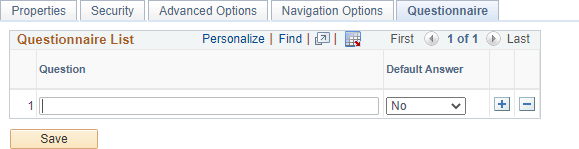
This example illustrates the fields and controls on the Template Properties: Questionnaire page. You can find definitions for the fields and controls later on this page.
| Field or Control | Description |
|---|---|
|
Question |
Enter the complete text for the question. Important: Only questions with a yes or no answer are supported. |
|
Default Answer |
Select a default answer for the question. |