Defining Activity Guide Template Security

Use the Template Properties: Security page to manage participants and privileges for the template.

Navigation:

  1. In the Setup Activity Guide WorkCenter, click the Template Properties task.

  2. Select the Security page.

This example illustrates the fields and controls on the Template Properties: Security page. You can find definitions for the fields and controls later on this page.
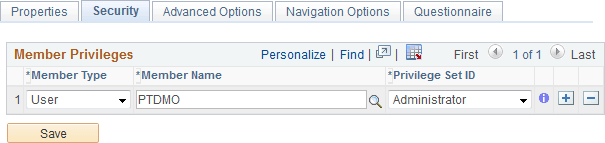
Template Properties: Security page

Use the Administrator privilege set for the roles (or users) who will be responsible for maintaining this template and any activity guide instances generated from it. Use the Contributor privilege set for the users (or roles) who will be assigned to complete the action items within an active instance.

Field or Control Description

Member Type

Select the type of participant you want to add to the activity guide template. Available values include:

Member Name

Specify the user ID or role name for the participant.

Privilege Set ID

Select a privilege level you want to assign to the participant:

  • Administrator — Administrators can make modifications to the template and any instances generated from the template including modifying properties, modifying participants, and maintaining action item definitions.

    Oracle recommends that you assign the administrator privilege to a system-defined administrative role such as Portal Administrator, PTAI_ADMINISTRATOR, and so on.

  • Contributor — Contributors are the only participants who can complete assigned action items within an active instance. Oracle recommends that you assign the contributor privilege to user ID such as an employee, a customer, a partner, and so on.

    In addition, an activity guide tile generated from this template will display only those activity guide instances generated from this template for which they have contributor privileges. Plus, the Activity Guides - In Progress homepage pagelet will display activity guide instances only for users who have been assigned the contributor privilege.

  • Viewer — Viewers have read-only access to the activity guide instances and their action items.

    Important: The Viewer privilege does not have any practical usage in the current implementation.