Integration Broker Diagnostics Page
The Integration Broker Diagnostics page displays details of the nodes in the Integration Broker network and the trusted nodes in single signon. The Integration Broker Diagnostics page enables you to review the details of each active node without having to open the Node Definitions page for each node to check the values entered in the node. However, if you need to modify any value of a node, you must open the Node Definitions page on the system in question.
To view the Integration Broker Diagnostics page:
-
Select .
-
In the Configure Unified Navigation center, click the Unified Navigation Status link to open the Unified Navigation Configuration Status page in the target area.
-
On the Unified Navigation Configuration Status page, select the Diagnostics page.
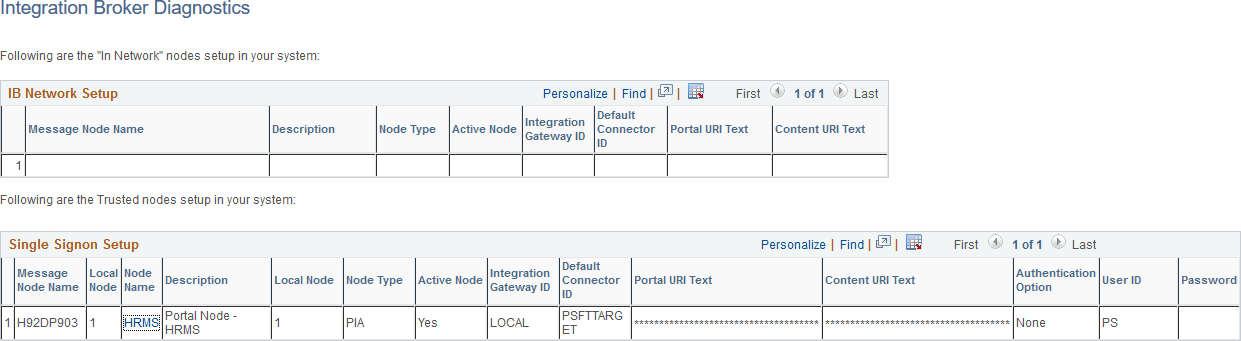
This example illustrates the nodes in the Integration Broker network and the trusted nodes in the single signon setup.
| Field or Control | Description |
|---|---|
|
Message Node Name |
|
|
Node Name |
In the Single Signon Setup grid, the Node Name column displays all the active nodes associated with each default local node in the unified navigation cluster. Click a node name to open the Node Definitions page where you can update to edit the local configuration of this node. |
|
Portal URI Text |
The Portal URI Text column displays the URI text for the portal servlet (psp) defined for the node. If you need to change this value, click the node name in the Single Signon Setup grid to edit the local configuration of this node. |
|
Content URI Text |
The Content URI Text column displays the URI text for the content servlet (psc) defined for the node. If you need to change this value, click the node name in the Single Signon Setup grid to edit the local configuration of this node. |
Related Topics