Pagelet Extensions
Some pagelets use pagelet extensions, which are the supporting or supplementary components for a pagelet. They are not displayed on your homepage; you access pagelet extensions by associating them with links and buttons on pagelets. Pagelet extensions are optional. They are a means of providing additional information or editing capability that is too cumbersome to display on the pagelet.
You could configure a homepage pagelet so that each item is a link to the worklist item in another database, or to the personal task defined in the portal, or to a variety of resources.
The Tasks pagelet is a homepage pagelet that is designed to display a short list of relevant tasks. If dozens of tasks were open, which is likely over time, the pagelet would grow to be too long and possibly crowd out relevant, actionable data on other pagelets. This example illustrates that the Tasks pagelet is configured with active links and buttons that access pagelet extensions, which enhance the functionality of the pagelet.
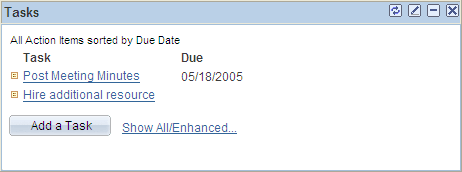
Here you see two extension pages that you access from the Tasks pagelet:
-
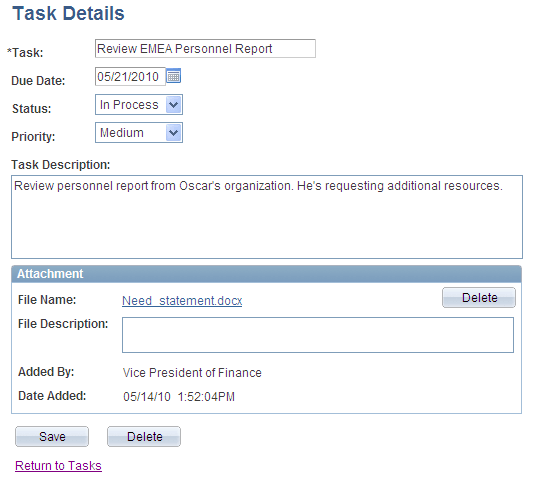
The Task Details page.
Click a link for a task name to access the Task Details page, which you use to view or modify personal task information. The Task Details page enhances the pagelet by showing more detail and enabling you to perform further actions, such as attaching a file or deleting the task.
-
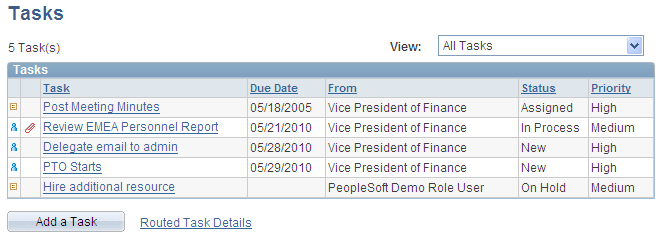
The Tasks page.
Click the Show All/Enhanced link to access the Tasks page, which provides the user with more options such as the ability to display all or certain types of tasks. Because it is a standard page, the extension page can use a grid to retrieve and display a longer list of tasks. In addition, the extension page is also better suited to display more details because it is wider than the pagelet and can show more columns The following example displays more details on the Tasks page.