Selecting an OBIEE Report Data Source
Access the Select Data Source page. (Select On the Specify Pagelet Information page, click the Next button.)
Select OBIEE Report in the Data Type field.
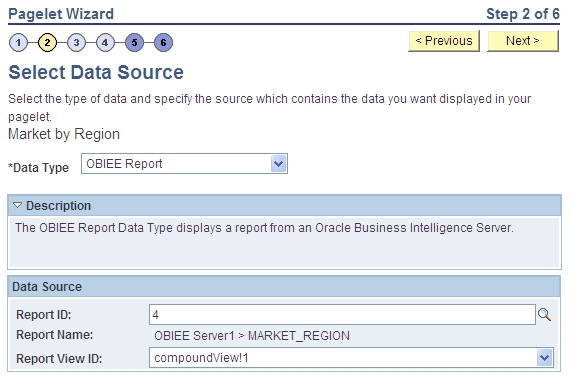
This example illustrates the fields and controls on the Select Data Source page for an OBIEE report data source. You can find definitions for the fields and controls later on this page.
Data Source
| Field or Control | Description |
|---|---|
|
Report ID |
Select the report that you want to be the data source. Only reports that have been loaded into the PeopleSoft application appear in this list. |
|
Report Name |
This field displays the OBIEE server name and the report name. This field is display-only. |
|
Report View ID |
Select the view or report type as created in the OBIEE application. |