Selecting a PeopleSoft Query Data Source
Access the Select Data Source page. (Select On the Specify Pagelet Information page, click the Next button.)
Select PS Query in the Data Type field.
This example illustrates the fields and controls on the Select Data Source page for a PeopleSoft query data source. You can find definitions for the fields and controls later on this page.
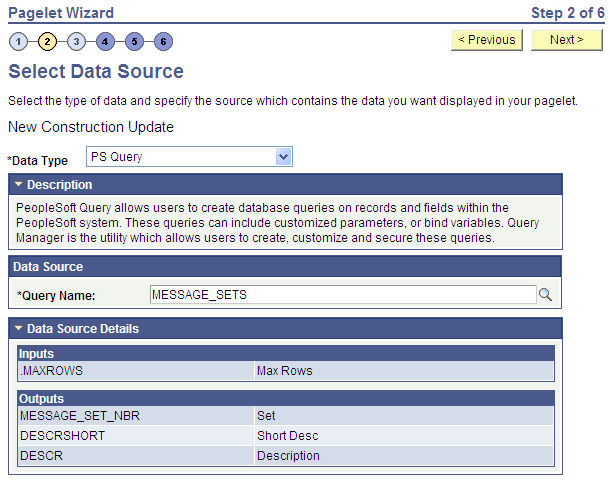
Queries typically return a number of columns and rows. Queries for pagelets should be selected based on available display space on the homepage. In addition, avoid selecting long-running queries that can delay the display of the homepage.
Note that public query results are available to portal viewers only if they have appropriate access to the underlying data record. Permission lists in the users’ role definitions must contain query access groups that include the records in the query definition.
Note:
If data masking for personally identifiable information or other sensitive data has been enabled on a record field that is part of the criteria for the PeopleSoft query, then these data values are masked when displayed via Pagelet Wizard pagelets.
Data Source
| Field or Control | Description |
|---|---|
|
Query Name |
Select a query to serve as the data source for the pagelet. You can select any public query in the local database. PeopleSoft queries provide SQL access to any table recognized by the PeopleSoft system. This includes external, remote tables that are recognized by the PeopleSoft system by way of a database link. |
Note:
Even though a query is marked as public, PeopleSoft Query still applies security to the underlying records. Ensure that the users of this pagelet have query security access to the underlying records to avoid runtime errors.
Data Source Details
| Field or Control | Description |
|---|---|
|
Inputs |
Displays the data source parameter fields that correspond to the query’s input prompts. This field also displays the required system-supplied .MAXROWS query data source parameter that you can use to limit the amount of data returned to the pagelet. |
|
Outputs |
Displays the data source parameter fields that correspond to the query’s output. |