Selecting a Search Record Data Source
Access the Select Data Source page. (Select On the Specify Pagelet Information page, click the Next button.)
Select Search Record in the Data Type field.
This example illustrates the fields and controls on the Select Data Source page for a search record data source. You can find definitions for the fields and controls later on this page.
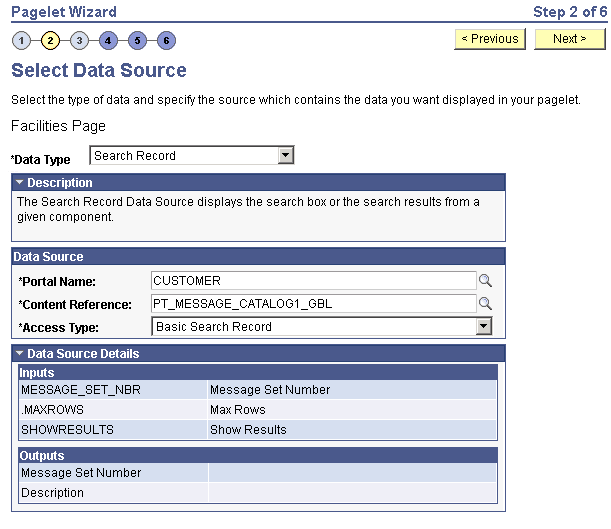
Search records typically return a number of columns and rows. When you select search records to be displayed on pagelets, consider the available display space on the homepage.
Data Source
| Field or Control | Description |
|---|---|
|
Portal Name |
Select the portal in which the search record for the pagelet resides. |
|
Content Reference |
Select the content reference for the search record. |
|
Access Type |
Select the type of access for the search record data. Options are: Basic Search Record: Select to have the search record pagelet retrieve data based on the basic search record defined in the selected portal. CI: <component interface name>: Select when the basic search record does not provide the required functionality, for example, when security or PeopleCode considerations need to be taken into account. This option is available if the selected search record has an associated component interface. Select to have the search record pagelet retrieve data by way of the component interface. See Component Interfaces: Creating Component Interface DefinitionsComponent Interfaces: Implementing PeopleSoft Component Interfaces. |
Data Source Details
| Field or Control | Description |
|---|---|
|
Inputs |
Displays search record key input fields, as well as other system-required input fields that are used to derive data that is displayed on the search record pagelet. |
|
Outputs |
Displays search record key output fields, as well as other output fields for which search results are displayed on the search record pagelet. These output fields are derived from the drop-down list box fields on the search record. If the SHOWRESULTS data source parameter field for the pagelet is set to N, the search key output fields appear as Search By drop-down list values on the pagelet. |