Specifying Navigation Collection Data Source Parameters
After selecting Navigation Collection as the data type on the Select Data Source page, access the Specify Data Source Parameters page. (Select On the Select Data Source page, click the Next button.)
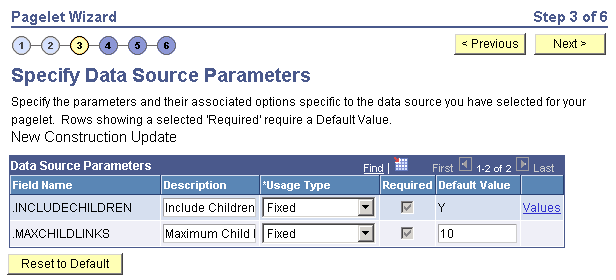
This example illustrates the fields and controls on the Specify Data Source Parameters for a navigation collection data source. You can find definitions for the fields and controls later on this page.
Data Source Parameters
Pagelet Wizard analyzes the selected navigation collection and retrieves a list of predefined parameters and any related prompt list values. You cannot add to the list of parameters.
| Field or Control | Description |
|---|---|
|
Field Name |
Displays the following data source parameters required by the navigation collection data source. .INCLUDECHILDREN: Determines whether the pagelet displays navigation collection child links. .MAXCHILDLINKS: If the pagelet is defined to display child links, determines the maximum number of navigation collection child links to display. |
|
Required |
This option is selected if the data source parameter must contain a value on the pagelet to retrieve data successfully. For example, the .INCLUDECHILDREN field is required. If this option is selected and is display-only, the value is set in the application class at the API level. |
|
Reset to Default |
Click to reset the values on this page to the default values specified by the navigation collection data source API. |
|
Values |
Click the Values link to set the default values for users. |
Personalization Instructions
Use the Personalization Instructions text box to enter instructional informs for the pagelet. These personalization instructions appear on the Personalization page of the pagelet.
Note:
Personalization instructions must be translatable.