Specifying OBIEE Data Source Parameters
After selecting OBIEE Report as the data type on the Select Data Source page, access the Specify Data Source Parameters page. (Select On the Select Data Source page, click the Next button.)
This example illustrates the fields and controls on the Specify Data Source Parameters page for an OBIEE report data source. You can find definitions for the fields and controls later on this page.
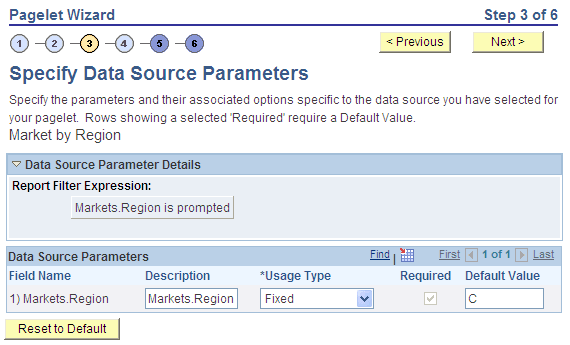
Data Source Parameters
Pagelet Wizard analyzes the selected OBIEE report and retrieves a list of predefined parameters and any related prompt list values. You cannot add to the list of parameters.
| Field or Control | Description |
|---|---|
|
Field Name |
Displays the data source parameters that correspond to the OBIEE prompts associated with the selected OBIEE report. This field also displays the required system-supplied .MAXROWS query data source parameter that you can use to limit the amount of data returned on the pagelet. |
|
Description |
This field contains a description that identifies the purpose or location of the OBIEE field. |
|
Required |
This option is selected if the data source parameter must have a value entered on the pagelet to retrieve data successfully. For example, the .MAXROWS field is required. If this option is selected and is display-only, the value is set in the application class at the application programming interface (API) level. If you leave this option deselected, the data source parameter value can be cleared at runtime, or it can be entered to refine the data selection criteria. |
|
Reset to Default |
Click to reset the values on this page to the default values specified by the OBIEE data source API. |