Specifying Pivot Grid Data Source Parameters
After selecting Pivot Grid as the data type on the Select Data Source page, access the Specify Data Source Parameters page. (Select On the Select Data Source page, click the Next button.)
This example illustrates the fields and controls on the Specify Data Source Parameters page for a pivot grid data source. You can find definitions for the fields and controls later on this page.
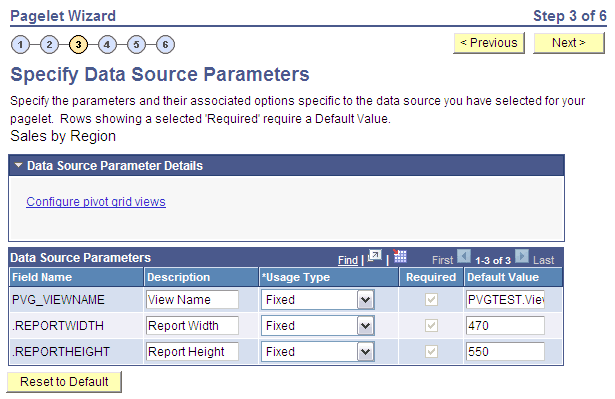
Data Source Parameter Details
Displays the Configure pivot grid views link, which you click to open the Pivot Grid Views Component page where you can define the pivot grid options.
Data Source Parameters
Pagelet Wizard analyzes the selected pivot grid and generates the list of pagelet parameters shown in this step. You cannot add to the list of parameters.
| Field or Control | Description |
|---|---|
|
Description |
Enter text that describes the field. |
|
Usage Type |
Select the way the system uses the parameter. Select one of these options:
|
|
Required |
Select to require a value for the parameter. |
|
Default Value |
Enter the parameter value that the system uses by default. |
|
Reset to Default |
Click to set all values on this page to the default values specified by the pivot grid data source API. |
Pivot Grid Views Component
Access the Pivot Grid Views page (Click the Configure pivot grid views link on the Specify Data Source Parameters page).
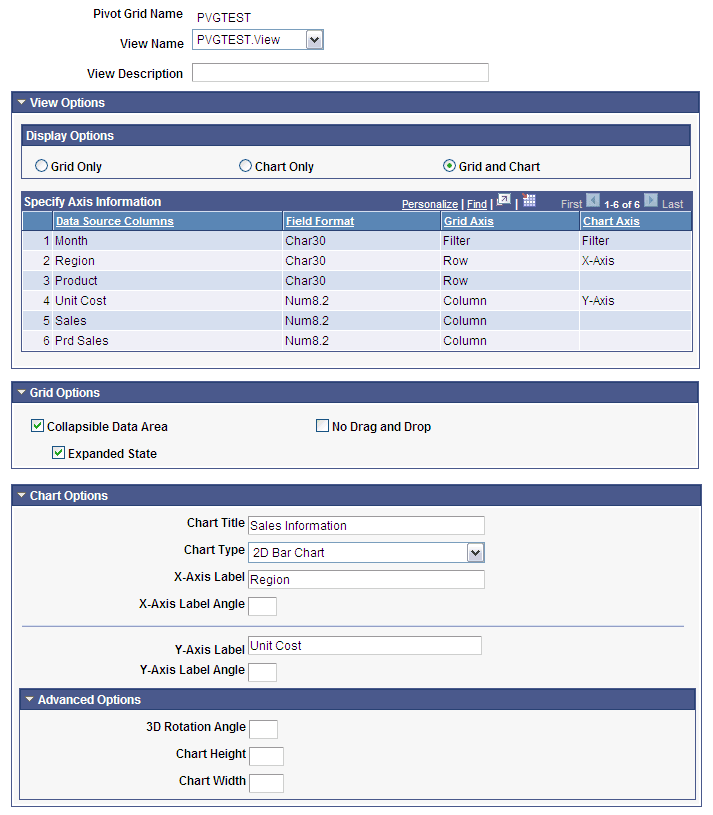
This example illustrates the fields and controls on the Pivot Grid Views page. You can find definitions for the fields and controls later on this page.
| Field or Control | Description |
|---|---|
|
View Name |
Select the pivot grid view to use for this pagelet. |
|
View Description |
Enter text that describes the pivot grid view. |
|
Display Options |
Select which elements appear on the pagelet. Choose one of these values:
|
|
Grid Options |
|
|
Chart Options |
Enter or select values for the title, type, x and y-axis labels and x and y-axis angles (in degrees) of the chart. |
|
Advanced Options |
Enter values for the three-dimensional rotation angle (in degrees), height (in pixels), and width (in pixels) of the chart. |
|
Save As |
Click to open the Save View As dialog box, where you can either save the current pivot grid model as a new view or update an existing view. |