Step 3: Target Page Information
Use the Target Page Information page to select the target page and specify certain attributes of the tile’s content reference definition.
Navigation:
On the Data Source Information page, click the Next button.
This example illustrates the fields and controls on the Target Page Information page. You can find definitions for the fields and controls later on this page.
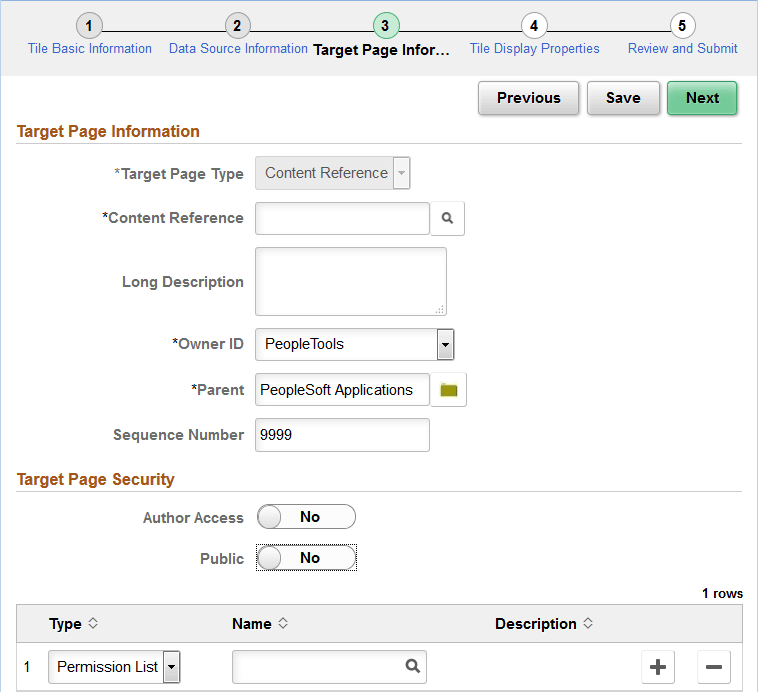
Target Page Information
| Field or Control | Description |
|---|---|
|
Target Page Type |
Select from the following options:
|
|
Content Reference |
When Content Reference is selected as the target page type, select an existing content reference from the portal registry on the Select CRef page. |
|
Target Page Name |
When either OBIEE Report or Pivot Grid Viewer is selected as the target page type, the value in this field is generated automatically. Note: When the field is editable, you can modify this to any unique name. |
|
Long Description |
Enter a description for the content reference (or content reference link) definition to be created. |
|
Owner ID |
Select an owner ID for the content reference (or content reference link) definition to be created. |
|
Parent |
Select a folder in the tile repository for the content reference (or content reference link) definition to be created. |
|
Sequence Number |
Enter a sequence number for the content reference (or content reference link) definition to be created. |
Target Page Security
Note:
For a content reference link, security is defined on the target content reference. The fields displayed are read-only.
| Field or Control | Description |
|---|---|
|
Public |
Select whether to allow public or selected security access:
|
|
Author Access |
Select Yes to provide the tile author with access to the target page regardless of any security restrictions assigned to the tile. This access is granted based on the author’s user ID. |
|
Type |
Select the type of security to assign to the target page definition. Options are:
|
|
Name |
Select the name of the permission list or role to which to authorize access to the tile. |
Related Topics