Using the Setup Activity Guide WorkCenter
Use the Setup Activity Guide WorkCenter to maintain an activity guide template definitions, maintain the action item definitions in the template , and to configure the deployment of the activity guide.
Navigation:
-
-
On the Manage Activity Guide Templates page do one of the following:
-
Click the Create Template button to create a new activity guide template and open the WorkCenter.
-
Click the Properties link for an existing template to open the WorkCenter on the Template Properties task.
-
Click the title link for an existing template to open the WorkCenter on the Configure Action Items task.
-
This example illustrates the Setup Activity Guide WorkCenter and the tasks in the Setup Activity Guide pagelet.
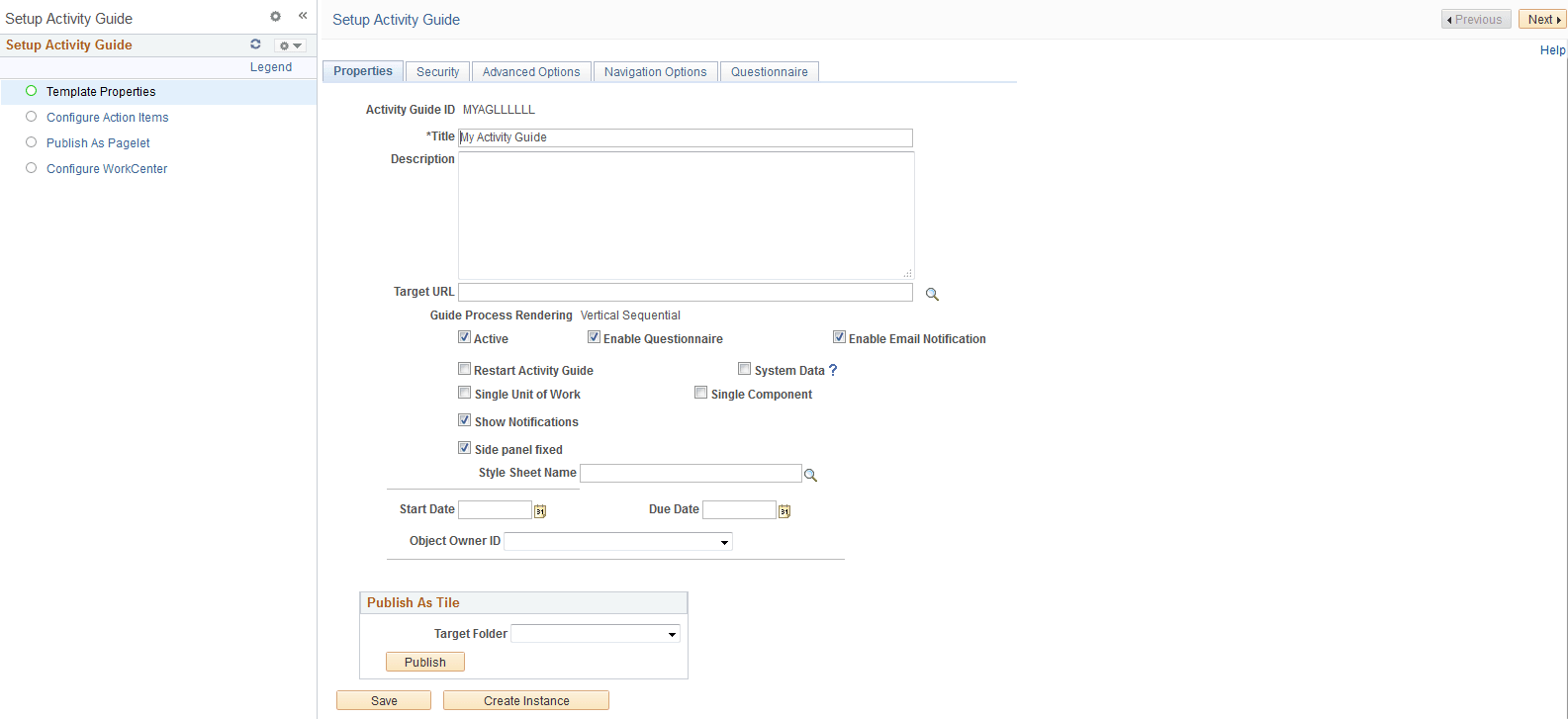
The Setup Activity Guide pagelet (itself an activity guide) presents the four tasks you must complete to define and deploy an activity guide:
-
Template Properties –
Use the Template Properties task to define the activity guide template including its properties, members and privileges, advanced options, and pagelet options. See Creating and Maintaining Activity Guide Templates.
-
Configure Action Items –
Use the Configure Action Items task to create a definition for each action item in the template. See Creating and Maintaining Action Items.
-
Publish as Pagelet –
For classic activity guides only, use the Publish as Pagelet task to generate the activity guide pagelet. See Deploying Classic-Only Activity Guides.
-
Configure WorkCenter –
For classic activity guides only, use the Configure WorkCenter task to configure a WorkCenter for the activity guide. See Configuring a WorkCenter Page for a Classic-Only Activity Guide.