Viewing Menu Item Details
Access the Menu Item Detail page ().
This example illustrates the fields and controls on the Menu Item Detail page. You can find definitions for the fields and controls later on this page.
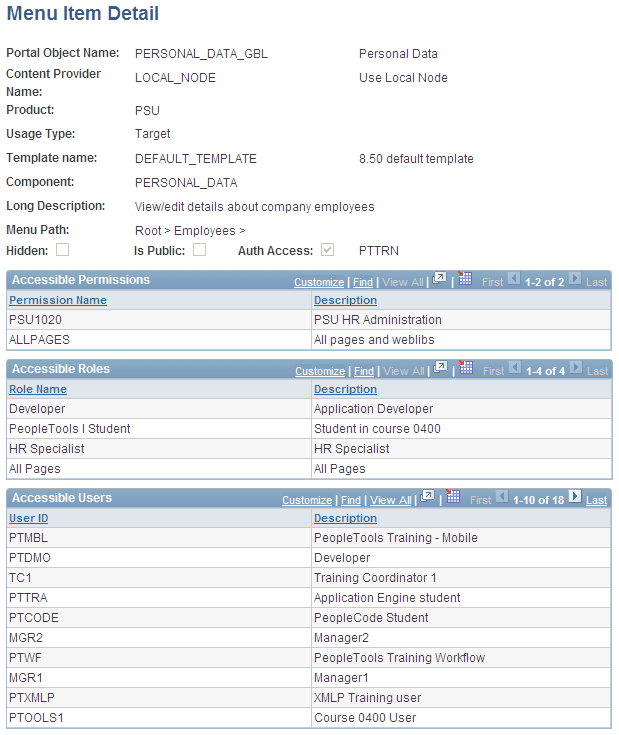
Use this page to review the portal registry information for a menu item. The details that appear include the exact users and the roles and permission lists that allow access to a given menu item.
| Field or Control | Description |
|---|---|
|
Usage Type |
Displays the type of object that is registered in the portal as a content reference. Possible values are Target, Pagelet, Frame Template, HTML Template, and Homepage Tab. |
|
Template Name |
Displays the template that controls how content appears on the page. The default template is used except for special circumstances. |
|
Component, iScript, and URL Type |
Information that appears depends on the URL type that is entered on the Content Ref Administration page. Possible URL type values are Non-PeopleSoft URL, PeopleSoft Component, PeopleSoft Generic URL, PeopleSoft Script, PeopleSoft Worklist URL, and Remote Portlet. The availability of these values depends on the selected usage type. |
|
Long Description |
Displays the text that appears when you move the cursor over the menu navigation link. |
Note:
The Accessible Permissions, Accessible Roles, and Accessible Users scroll areas are populated only if the access type is set to permission list.
See Defining Content References.
Accessible Permissions
This section displays the permission list name and description for all permission lists that can access this menu item.
Note:
If the component or iScript is using a local node with no extra parameters, the permission lists are automatically populated based on the menu object component security.
Accessible Roles
Displays the role name and description for all roles that can access this menu item.
Accessible Users
Displays the user ID and description for all users that can access this menu item.