Defining Process Output Formats
To access the Process Output Format Settings page, select
This example illustrates the fields and controls on the Process Output Format Settings page. You can find definitions for the fields and controls later on this page.
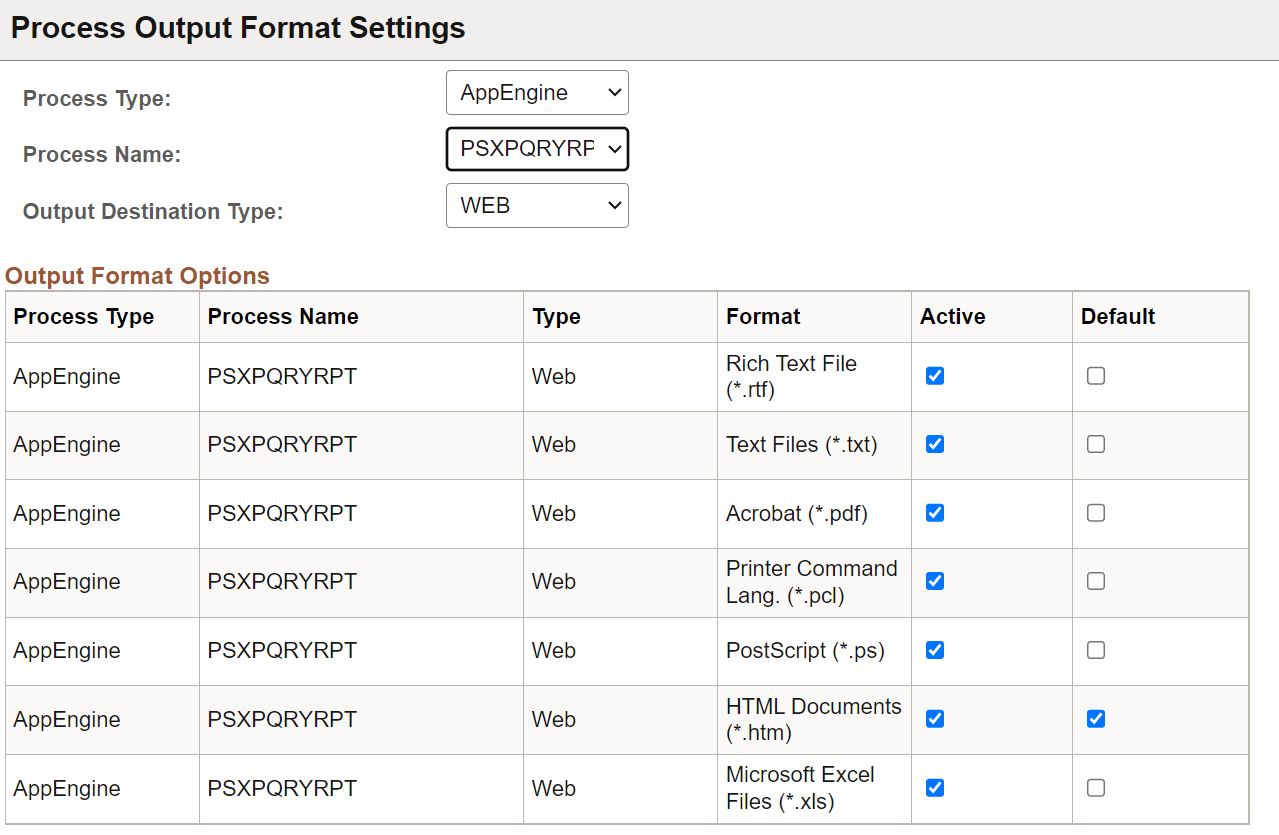
Use the Process Output Format Settings page to specify active and default output formats for each process type.
Note:
When you are scheduling a process through PeopleCode using the ProcessRequest object, the default output format is used when the output format that is specified has been deactivated, or the output format was not specified.
| Field or Control | Description |
|---|---|
|
Process Type |
Select the process type, or leave blank to display all process types. |
|
Process Name |
For process types that have registered non-unique processes, this field is used to identify the non-unique process. Note: Non-unique processes include Connected Query (PSCONQRS), Query (PSQUERY), and BI Publisher (PSXPQRYRPT). |
|
Output Destination Type |
Select a specific output type to further define the output format options. Only output types specified as Active appear. |
|
Format |
Lists the format types that are available for the selected process type and output type. This field is display-only. |
|
Active |
Select the appropriate check box to make the format type active for the selected process type and output type. |
|
Default |
Select the check box next to the format type that you want to appear as the default output on the Process Request page. A message appears, informing you that the format type is disabled if you select a format type for which the Active check box is deselected. |