Defining System Purge Options
To access the System Purge Options page, select
This example illustrates the fields and controls on the System Purge Setting page. You can find definitions for the fields and controls later on this page.
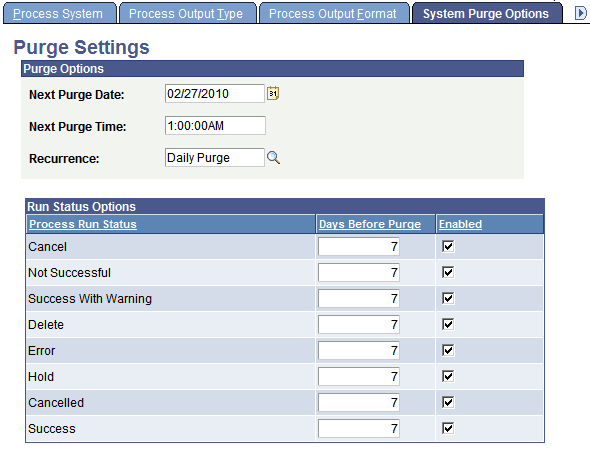
Use the Purge Settings page to empty the PeopleSoft Process Scheduler tables and file system. This operation will schedule the Application Engine program PRCSYSPURGE.
The PRCSYSPURGE program:
-
Updates statistics to all of the process request tables before deleting content.
-
Purges all process requests with a last update date that is past the Days Before Purge value for the specified run statuses.
-
Deletes all of the subdirectories in the Log_Output directory that are associated with the process requests that are purged from the process request table.
-
Purges the report repository tables with expired dates, based on the specified number of retention days.
-
Deletes all directories from the report repository that are associated with processes that were purged from the report repository tables.
-
Schedules the Application Engine PRCSRVCLN program if more than one active Process Scheduler server exists.
PRCSRVCLN refreshes the Log/Output directory for all active servers.
-
Schedules the Application Engine PSXPARCHATTR program for BI Publisher reports to archive report-related metadata and the URLs of the report files.
| Field or Control | Description |
|---|---|
|
Next Purge Date |
Enter the date on which the next file purge process is to run on the server. This is based on the recurrence schedule. |
|
Next Purge Time |
Enter the time when the next file purge process is to run on the server. This is based on the recurrence schedule. |
|
Recurrence |
Select a recurrence schedule for the purge process. |
Purge Settings
Specify purge criteria for each process run status that is listed.
| Field or Control | Description |
|---|---|
|
Days Before Purge |
Enter the number of days before a process should be physically deleted from the request table. |
|
Enabled |
If this check box is cleared, process requests with this run status are not purged. |
Related Topics