Defining Process Output Types
To access the Process Output Type Settings page, select
This example illustrates the fields and controls on the Process Output Type Settings page. You can find definitions for the fields and controls later on this page.
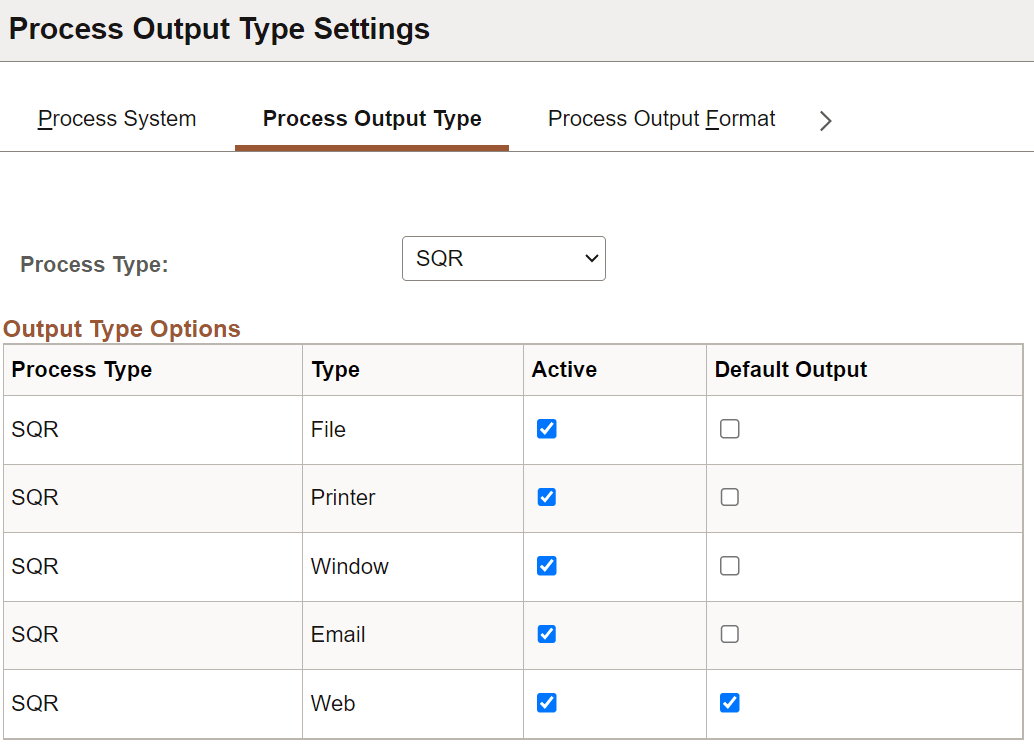
Use this page to specify active and default output types for each process type.
Note:
When you are scheduling a process through PeopleCode using the ProcessRequest object, the default output type is used when the output type that is specified has been deactivated or the output type was not specified.
| Field or Control | Description |
|---|---|
|
Process Type |
Select the process type that you want to edit or leave blank to display all process types. |
|
Type |
Lists the output types that are available for the selected process type. This field is display-only. |
|
Active |
Select the appropriate check box to make the output type active for the selected process type. |
|
Default Output |
Select the check box next to the output type that you want to display as the default on the Process Request page. |
Note:
The Process Output Format Settings page uses information about output types; therefore, you need to save any changes that were made to output type settings before attempting to change an output format setting.