Defining Process System Settings
To access the System Settings page, select
This example illustrates the fields and controls on the System Settings page. You can find definitions for the fields and controls later on this page.
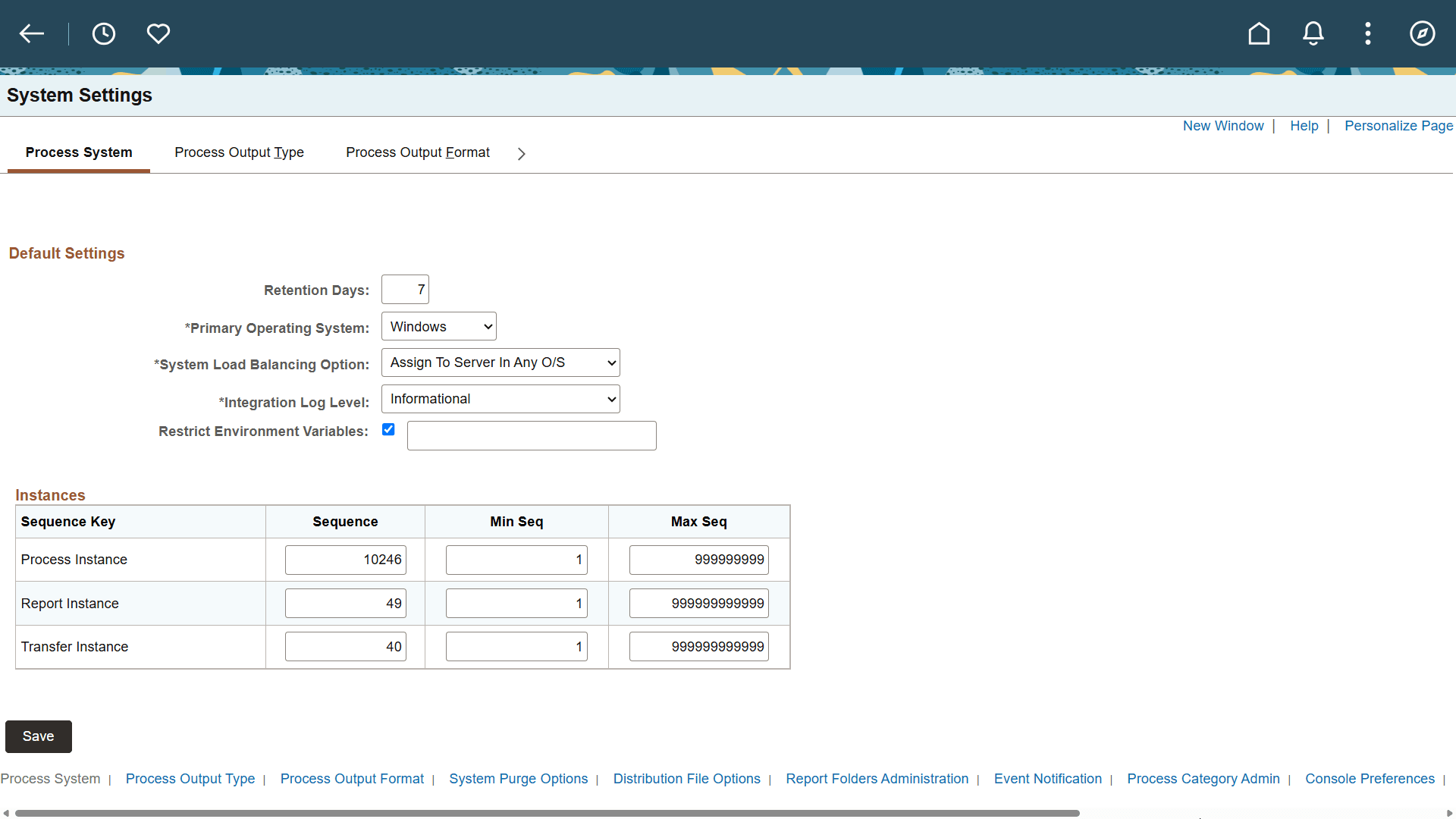
| Field or Control | Description |
|---|---|
|
Retention Days |
Enter the number of days before the files that are on the report repository are deleted. This value is used with the current date to calculate the expiration date on reports in Report Manager when retention days are not specified in Process Type definition, Process definition, or Run Control. |
|
Primary Operating System |
Enter the default operating system. A run location of Any picks a server of this type. Note: If this field is left blank, the request will be scheduled by a Process Scheduler server with the default O/S. |
|
System Load Balancing Option |
Select to assign to primary O/S only or server in any O/S. Assign To Primary O/S Only: Select to have Master Scheduler reassign workload to another Process Scheduler server with the primary O/S Assign To Server In Any O/S: Select to have Master Scheduler reassign workload to any available Process Scheduler server. When the Do Not Use Option is selected on the Server Definition page, the server takes a request only when the name of the server has been specified on the Process Request page or in any of the definition tables. Note: This field is used in conjunction with a Master Scheduler server. This field will be ignored if no Master Scheduler server is available to perform the load balancing. |
|
Integration Log Level |
Select to set the integration log level for process status change messages when SetNotifyAppMethod() or SetNotifyService() is used while scheduling the process. Error: Select to log only error messages in IB transactions for process status changes. Informational: Select to log all messages in IB transactions for process status changes. None: Select to log no messages for process status changes. |
|
Restrict Environment Variables |
Select to restrict the environment variables that users can specify in output file paths. Enter the permitted environment variables in the adjacent field as a comma-separated allowlist. When selected, Process Scheduler rejects environment variables that are not included in the allowlist. |
Integration Log Level
The Integration Log can also be set at Process Definition but configuration at System Settings will take preference.
The preference for the configuration for individual levels are as defined in the below table:
| System Settings | Process Definition | Preference |
|---|---|---|
|
None |
Any mode (ignored) |
No messages will be logged for process status changes. |
|
Error |
None |
No messages will be logged for process status changes for the particular process. |
|
Error |
Informational (ignored) |
Only error messages in IB transaction for process status changes will be logged. |
|
Informational |
None |
No messages will be logged for process status changes for the particular process. |
|
Informational |
Error |
Only error messages in IB transaction for process status changes will be logged for the particular process. |
|
Informational |
Informational |
All status change messages with IB transaction IDs will be logged. |
System Settings
Set system settings for the following sequence keys: Process Instance, Report Instance, and Transfer Instance. The instance number acts as a counter.
| Field or Control | Description |
|---|---|
|
Sequence |
Indicates the last instance number that was used. |
|
Min Seq (minimum sequence) |
Indicates the lowest instance number to be used. |
|
Max Seq (maximum sequence) |
Indicates the highest instance number to be used. When this number is reached, the system starts numbering again from the minimum sequence number. |
Note:
The maximum value for Process Instance is 2,147,483,646. The maximum value for Report Instance and Transfer Instance is 999,999,999,999,999.