Setting Recurrence Schedule for Weekly and Monthly Recurrences
Selecting the Weekly or Monthly recurrence pattern activates an additional Recurrence field in the Recurrence Pattern grid on the Recurrence Definition page. Using this option, you can set a recurrence schedule for your weekly and monthly recurrence options.
This example illustrates the Recurrence Definition page where the Recurrence field is activated with the selection of the Weekly recurrence pattern option.
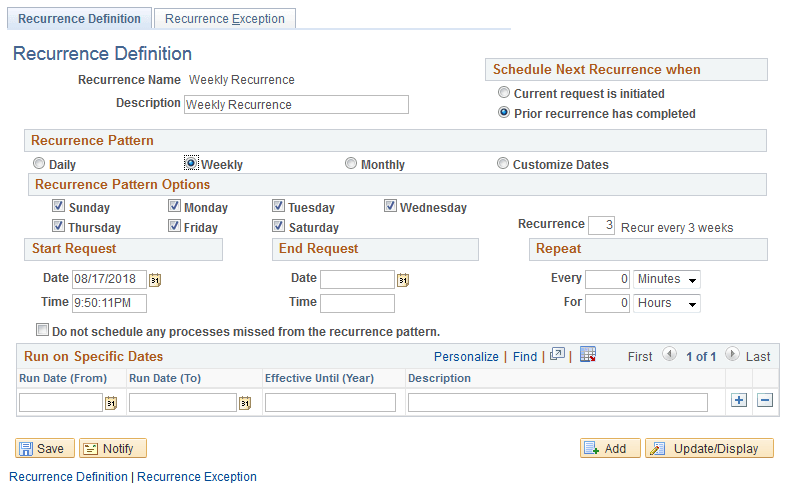
The default value for the Recurrence field is set to 1.
Weekly
To set a recurrence schedule for weekly recurrences:
-
Select
-
Select Add New Value and enter a recurrence name.
The Recurrence Definition page appears.
-
Select the Weekly recurrence pattern.
-
Go to the Recurrence field and set the value according to your chosen recurrence schedule.
If the value for the Recurrence field is set to 2, then it is a Bi-Weekly recurrence, and the scheduled recurrence will repeat every alternate week. For example, if the weekly recurrence is scheduled for Tuesday and the Recurrence field is set to 2, the pattern will repeat itself every alternate Tuesday till the recurrence ends.
Monthly
To set a recurrence schedule for monthly recurrences:
-
Select
-
Select Add New Value and enter a recurrence name.
The Recurrence Definition page appears.
-
Select the Monthly recurrence pattern.
-
Go to the Recurrence field and set the value according to your chosen recurrence schedule.
If the value for the Recurrence field is set to 3, then it is a Quarterly recurrence, and the scheduled recurrence will repeat every three months. For example, if you select January 23, 2019 as the start request date and the Recurrence field is set to 3, the further instances will be scheduled for April 23, 2019, July 23, 2019, October 23, 2019 and so on till the recurrence ends.