Selecting Output Fields
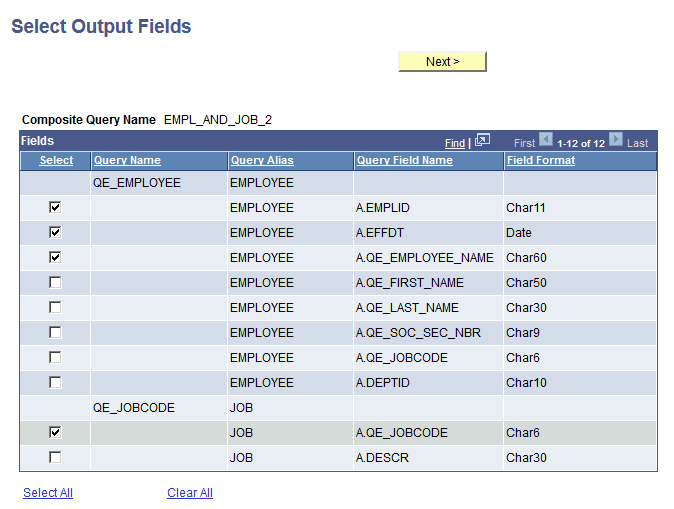
Use the Select Output Fields (PSCPQOUTPUTFILEDS) page to select the output fields for the composite query. This page displays all fields that are available from the base queries that you selected.
Navigation:
-
Select
-
Select the Add a New Value tab.
-
Enter the basic information in the Specify Composite Properties page and click the Next button.
-
Select two base queries in the Select Base Query page and click the Next button.
-
Specify query joint and click the Next button.
This example illustrates the fields and controls on the Specify Output Fields page. Three fields from the first query, QE_EMPLOYEE, are selected and one field from the second query, QE_JOBCODE, is selected.
| Term | Definition |
|---|---|
|
Select |
Select the check box to the left of each field that you want to add to the composite query output field list. |
|
Select All |
Click this link to select all fields in the queries. |
|
Clear All |
Click this link to deselect all fields in the queries. |
Note:
If the output field of the base query is a drilling URL field or is mapped to the drilling URLs and you add this drilling URL field to the composite query output field list, then you must add all query fields that are used to build the drilling URLs to the composite query output field list.
If the base query includes the drilling URL fields, only the drilling URL fields that have the drilling URL type set to Query, Component, or External are listed in the Select Output Fields page.