Considerations for Using Configurable Search
Consider the following when you use configurable search in classic or fluid components:
-
Supported primary action.
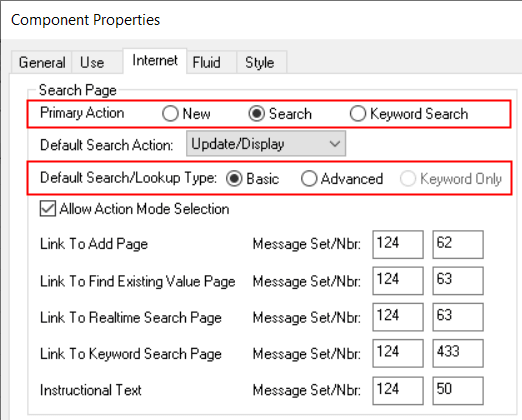
Configurable search does not support a combination of new, search, and keyword search as primary action for a single component. Configurable search supports the following combinations for primary action:
-
New only.
-
Search only.
-
Keyword Search only.
-
New and Search.
-
New and Keyword Search.
For descriptions of these primary actions, see Working with Search Pages.
If your business requirements demand both search and keyword search as primary action, you may consider registering two content references for the single component. In this case, you can configure one content reference for standard search and configure the other content reference for keyword search.
Component Properties page - primary actions and search/lookup types.
-
-
Supported search or lookup types.
Configurable search supports only Basic and Advanced as the search/lookup types for the search and keyword search primary actions. Keyword Only search/lookup type is not supported. For example, if the Keyword Only search/lookup type is selected for a component, and if the component is enabled for configurable search, the Basic search is displayed at runtime; the Keyword Only option is not honored.
For descriptions of search/lookup types or search modes, see Working with Search Pages.
-
In configurable search, the number of search results is specified on the Configurable Search Options page. The default value for the number of search results is 100, however you may modify this value on the Configurable Search Options page. Configurable search uses this value to limit the number of search results across classic and fluid components and standard and keyword search.
-
In configurable search, related actions are not displayed in search results, by default. However, you can display the related actions in search results by setting the Show Related Actions in Search Results property to Yes.
-
Configurable search supports facets on keyword search pages.
-
Configurable search supports data masking for sensitive data and personally identifiable information (PII).