Partitioning Application Data in the Search Index Build Process Using Data Partition
Indexing Search Definitions with a large volume of data can take a long time to complete.
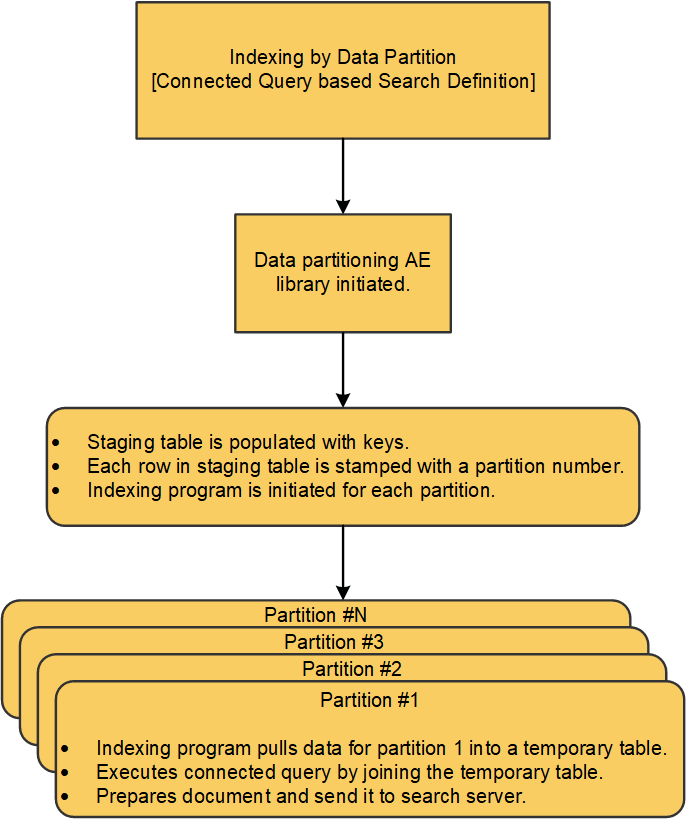
To overcome this issue, PeopleSoft Search Framework enables you to partition application data using the Index By Data Partition option. After you select any eligible field from the search definition (including date, datetime, non-date fields, or numeric fields) and specify the partition values along with the number of partitions, the framework partitions the data almost equally to process it in parallel. The search index build process then creates multiple PTSF_GENFEED Application Engine programs to run the query on each partitioned data.
Note:
To index data for a specific field value or set of field values, specify both Field Name and Field Value. If these values are not specified, indexing process will continue as usual.The run control IDs for each partition are auto generated with naming convention RUNCNTL_<NUMBER OF PARTITIONS>_<PARTITION NUMBER>.
The following illustration describes the process flow involved in partitioning application data using the Index By Data Partition option.
To enable the Index By Data Partition option, you must specify the values in the Index By Data Partition grid on the Advanced tab of the selected search definition. Oracle recommends that you use this option only for large data volume.
For more information, see Working With Advanced Settings.
This example illustrates the fields and controls on the Build Search Index page after enabling the Index By Data Partition option for non-date field. You can find definitions for the fields and controls later on this page.
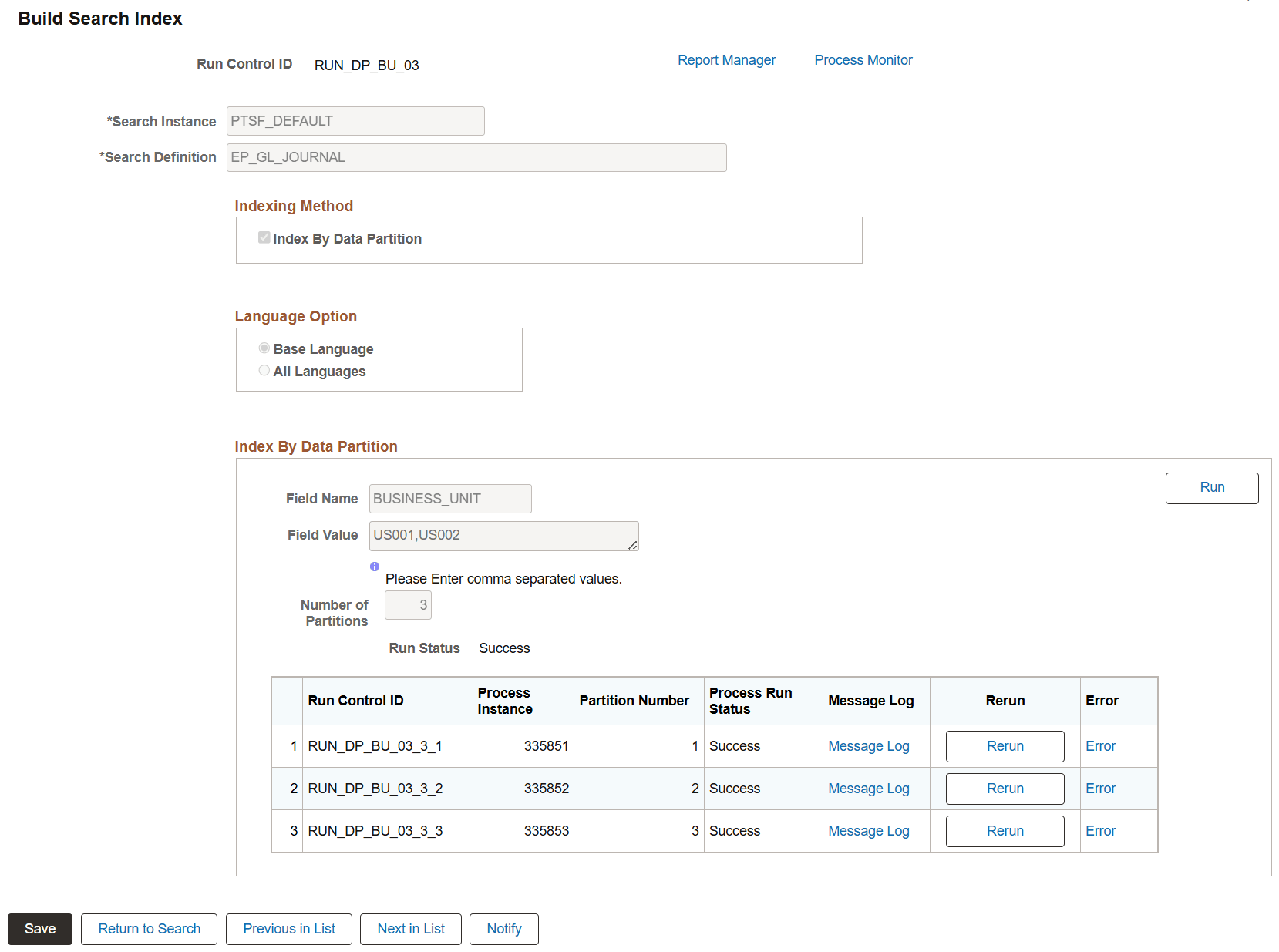
| Field or Control | Description |
|---|---|
|
Field Name |
Select an eligible field from the search definition for data partitioning. |
|
Field Value |
Enter one or more values for the selected non-date field to define the data partitions. For multiple entries, separate each value with a comma (for example, US001, US002). This field appears when a non-date field is selected. |
|
Start Date |
Specify the start date time of the data to index. This field appears when a Date/Datetime field is selected. |
|
End Date |
Specify the end date time of the data to index. This field appears when a Date/Datetime field is selected. |
|
Number of Partitions |
Enter the number of partitions you want the search index build process to create. |
|
Run |
Click the Run button to start the indexing program. |
|
Run Status |
Displays the run status. |
|
Run Control ID |
Displays the run control ID used to generate for each partition. |
|
Process Instance |
Search index build process creates multiple PTSF_GENFEED Application Engine programs for the specified number of partitions. Displays the process instance for each partition. |
|
Partition Number |
Displays the partition number for each partition. |
|
Process Run Status |
Displays the status of each process instance. |
|
Message Log |
Use the Message Log link to view the progress of the process. |
|
Rerun |
Use the Rerun button to run the partitioned process again. This link is activated only in the case of failure. |
|
Error |
If the run status displays an error status, use the Error link to view the error message. This link is activated only in the case of failure. |
PeopleTools recommends the following points when you partition the application data using the Index By Data Partition option:
-
The number of temporary tables is equal to five times the number of parallel processes planned.
For more information, see Application Engine: Understanding Temporary Tables.
-
Before using Index By Data Partition, ensure that the maximum concurrent setting is set appropriately.
-
Before using Index By Data Partition, ensure that a sufficient number of AESRVS are available.