Partitioning Application Data in the Search Index Build Process
Indexing of search definitions that have reasonably large data volume can pose performance issues. To overcome such performance issues, PeopleSoft Search Framework enables you to partition the application data using the Index by Date Range option. After the date range and number of partitions are specified, the Partition Manager partitions the date range into equal date spans based on the number of partitions. The search index build process creates multiple PTSF_GENFEED Application Engine programs to run the query on the partitioned data. The search index build process also creates multiple run control IDs based on the number of partitions that enables you to re-run any of the run control IDs associated with a partition. The partitioning of application data is performed based on the date range and the number of partitions that are specified.
You can specify the number of partitions, but you cannot control the date span within a date range that is allotted for each partition. The Partition Manager allots the date span for the number of partitions specified by you. However, the Partition Manager does not consider data concentration to come up with the ranges. Hence, in case of large data volumes, the data distribution may not be equal for each partition range, resulting in some processes taking huge loads. Search Framework allows you to adjust these date ranges as needed to create an evenly spread data volume to index.
Partitioning of application data works best when the volume of data is evenly spread over the specified date range. The purpose of partitioning is to divide the data volume into chunks and to run a connected query on the partitioned data, so when you plan to use the partitioning option, you must consider whether the search documents for a specific search definition are spread evenly over a specific date range. That is, if within a date range, for example, 01/01/2017 to 03/31/2017, a huge volume of search data is concentrated in the month of March and the other two months have few attachments, and you specify 3 partitions, then the partitioning may not be very effective because only one partition may get the bulk of the search documents, so you may still face performance issues.
The naming convention followed for run control IDs that are generated for each partition is as follows: _<USERID>_RUNCNTL_<TIME>_<SEQUENCE NUMBER>
For example, _QEDMO_RUNCNTL_020022_2
Note:
Partitioning is available for both full and incremental indexing. However, Oracle PeopleSoft recommends that you use partitioning only with full indexing.
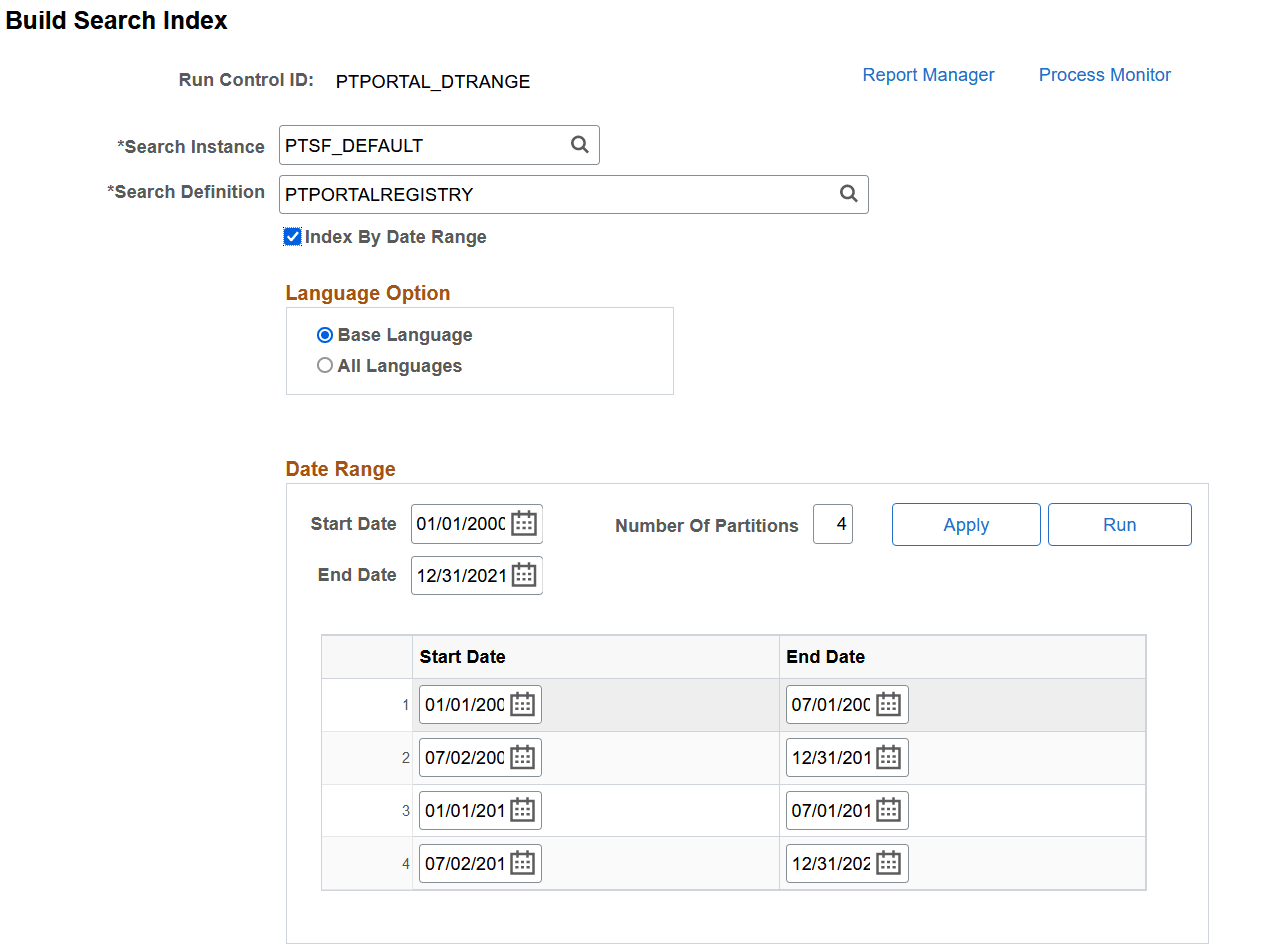
This example illustrates the fields and controls on the Build Search Index page after enabling the Index by Date Range option. You can find definitions for the fields and controls later on this page.
| Field or Control | Description |
|---|---|
|
Start Date |
Specify the start date of the date range. |
|
End Date |
Specify the end date of the date range. |
|
Number of Partitions |
Enter the number of partitions you want the search index build process to create. |
|
Apply |
When you select the Apply button, Partition Manager creates partitions based on the specified number. You can then modify the date ranges. Note: Save the settings before you select the Run button. |
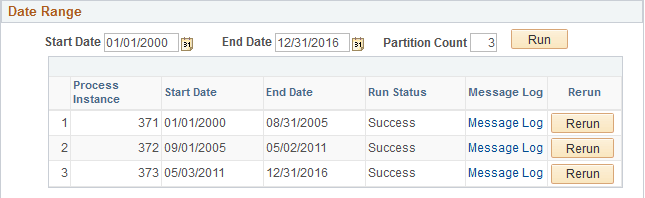
After you use the partitioning option and run the indexing process, the Build Search Index page displays the following information.
Note:
Do not use Date Range partitioning on any index that uses preprocessing unless the preprocessing has been modified to also use the date ranges. If you use Date Range partitioning on an index that uses preprocessing, it may cause unintended results.
This example illustrates the fields and controls on the Date Range grid. You can find definitions for the fields and controls later on this page.
| Field or Control | Description |
|---|---|
|
Process Instance |
Search index build process creates multiple PTSF_GENFEED Application Engine programs for the specified number of partitions. Displays the process instance for each partition. |
|
Start Date |
Displays the start date (within the specified date range) for each partition. |
|
End Date |
Displays the end date (within the specified date range) for each partition. |
|
Run Status |
Displays the status of each process instance. |
|
Message Log |
If the run status displays error status, use the Message Log link to view the error message. |
|
Rerun |
Use the Rerun button to run the partitioned process again. |