Setting Namespace Aliases
Namespace aliasing enables you to re-use an index or indices built on an environment (original environment) on another environment (which is referred to as “new environment” for purpose of differentiation), thus avoiding the necessity to re-index the same search definitions on the new environment. The namespace aliasing feature is handy when you need to clone environments or when the middle-tier changes.
When you need to clone an environment, for example, you clone a test FSCM environment (FSCMTEST), where all the search definitions in FSCMTEST are already indexed to a search server, as a staging FSCM environment (FSCMSTAGING), you can re-use the index or indices of FSCMTEST from the FSCMSTAGING environment that is connected to the same search server by setting up namespace aliasing.
When the Application server or Web server changes, but is connected to the same database, you can use namespace aliasing to map the new environment to the original environment and thus re-use the index or indices of the original environment.
The namespace aliasing feature enables you to map the database name, node name, and node URI of the new environment to the original environment where the indices are built. The new environment re-uses the indices on the original environment, so users can perform search in the new environment without having to wait for indices to be built. Also, you can perform incremental indexing to update the indices from the new environment.
You can use the Namespace Alias Settings page to set namespace aliasing or you can use the PTSFConfigureSearch plug-in in Automated Configuration Manager to set namespace aliasing.
Access the Namespace Alias Settings page by selecting . Then click the Set Namespace Aliases link.
Alternatively, access the Namespace Alias Settings page by selecting .
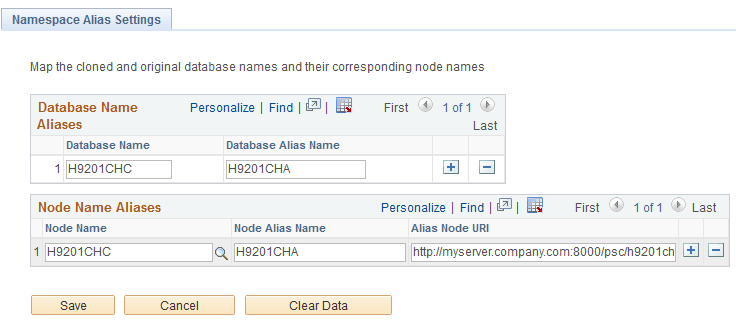
This example illustrates the fields and controls on the Namespace Alias Settings page. You can find definitions for the fields and controls later on this page.
| Field or Control | Description |
|---|---|
|
Database Name |
The name of the database in the new environment. You may enter the same database name as in the original environment. |
|
Database Alias Name |
The name of the database in the original environment. |
|
Node Name |
The name of the node in the new environment. You may enter the same node name as in the original environment. |
|
Node Alias Name |
The name of the node in the original environment. |
|
Alias Node URI |
The node URI in the original environment. When you enter the URI, follow this syntax: http or https://<hostname>:<port>/psc/<sitename>/ Optionally, you can copy the URI entered for the node in the Content URI Text edit box on the Node Definitions page (Portal tab). |
|
Clear Data |
Clears the data entered on the page and also removes it from the database. |