Custom Navigation Panel Items
You can add custom navigation panel items to the My Preferences component.
When you add custom preference items they appear in the navigation panel on the left side of the My Preferences page, as illustrated by the following example.
This example illustrates the My Preferences page with the default General Settings navigation panel item and several custom items added to the page.
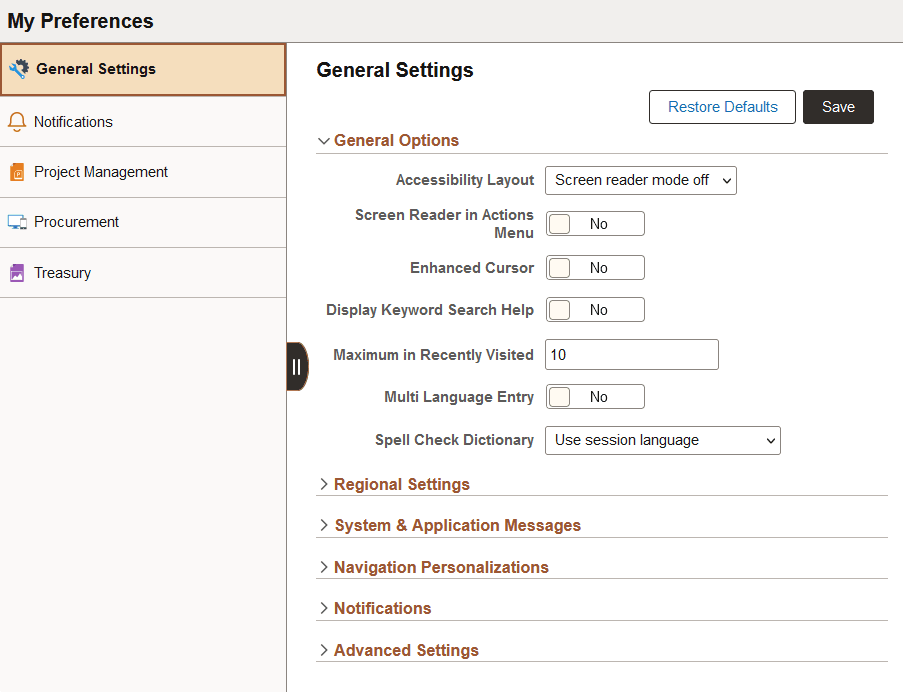
In the example, the list in the left navigation panel includes navigation panel items defined in the Fluid Structure Content > My Preferences folder of the current portal, and its first-level sub-folders in all systems in the same cluster.
The list is sorted by the sequence number of corresponding content reference objects or folder reference objects across the systems. You may see leaf items and folders in mixed order, depending on how the sequence numbers are defined.