Defining the Query Tree
Access the Tree Definition and Properties page (click the Create a New Tree link on the Basic Search page).
Before you can insert nodes for access groups and record components, you must first define a number of important characteristics for the tree.
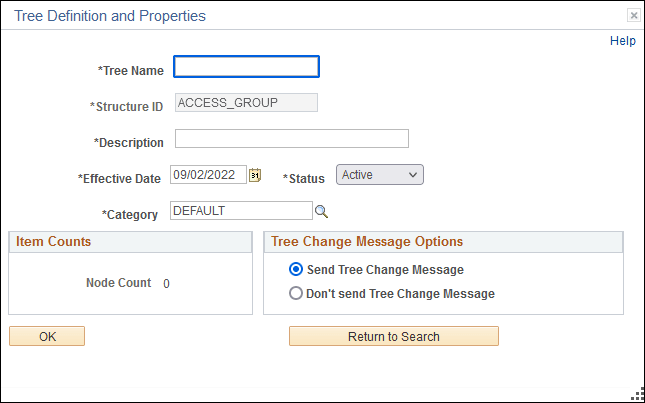
This example illustrates the fields and controls on the Tree Definition and Properties page.
| Field or Control | Description |
|---|---|
|
Tree Name |
For the tree name, we recommend that you start the name with QRY_ so that you can easily identify the tree as a custom query tree. The standard query trees we deliver with the system start with QUERY_. |
|
Structure ID |
The Structure ID is read only and always reads ACCESS_GROUPS for Query access trees. |
|
Description |
The description appears with the name and effective date in the list box when you select from a list of trees. |
|
Effective Date |
The status default is set to Active. Query trees are available immediately if the effective date is active; you don’t need to run an SQR utility like you do for organizational security trees. |
|
Category |
If necessary add a category, which are groupings of the definitions. |
|
Item Counts |
Item Counts shows the number of nodes within the access group. |
Once you've completed the tree definition, click OK. On the Enter Root Node for Tree page, select an existing Access Group using the Lookup Access Group control, or create a new one.