Installing Selected PeopleSoft-Specific Schema Extensions
Access the Schema Management page (select and click the Schema Management tab).
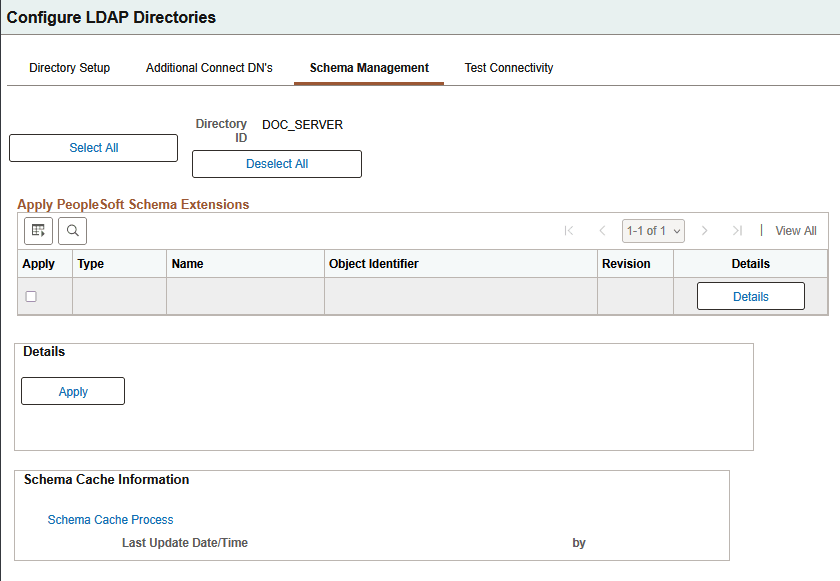
This example illustrates the fields and controls on the Configure LDAP Directories - Schema Management page.
Note:
Unless you have installed the PeopleSoft Directory Interface product, you might not have any PeopleSoft schema extensions available to you.
Note:
The Schema Management page enables you to add PeopleSoft-delivered object classes and attribute types to your directory. If you add attributes and object classes using the Schema Management page, you must also delete them using this page.
| Field or Control | Description |
|---|---|
|
Apply |
Select this check box to apply the selected schema extension type to your directory. |
|
Type |
Displays the type of schema extension, either Object Class or Attribute Type. |
|
Name |
Displays the schema extension name. |
|
Object Identifier |
Displays the schema extension object identifier. The sequence 1.3.6.1.4.1.2810.20 identifies the object as a PeopleSoft object. The second to last number is either a 1 or a 2. A 1 indicates an object class type and a 2 indicates an attribute type. The last number indicates the sequence in which the extension was created. |
|
Revision |
Displays the number of times the schema extension was revised. |
|
Details |
Click to display details about the selected schema extension in the Details region at the bottom of the page. |
|
Select All |
Click to select all the schema extensions to apply to your directory. |
|
Deselect All |
Click to deselect every schema extension. |
|
Apply |
Click to apply the selected schema extensions to your directory. |
Details
When you click a schema extension Details button, the system displays the details of that extension. In addition to the object identifier and name, you may also be interested in the Superiors detail, which indicates which extensions, if any, are above this one in the hierarchy. Also of interest is the Type detail, which indicates whether the schema extension is a mandatory, optional, or auxiliary extension.
Schema Cache Information
For convenience, you can use the Schema Cache Process link to transfer you to the Schema Cache page so that you can invoke the Schema Cache process. Last Update Date/Time and Last Update User ID enable you to monitor the frequency of updates as well as the last administrator to run the process.