Setting Personalization Permissions
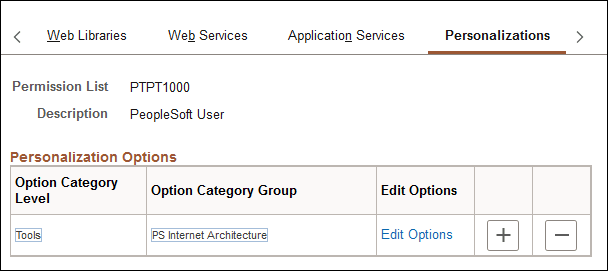
Access the Permission Lists - Personalizations page (select and click the Personalizations tab).
This example illustrates the fields and controls on the Permission Lists - Personalizations page.
Note:
Only those personalization options that accept customization are available for your users to modify.
| Field or Control | Description |
|---|---|
|
Option Category Level |
Displays the high-level grouping of personalizations. |
|
Option Category Group |
Shows the further categorizations of personalization options within the category level. |
|
Edit Options |
Click to access the Personalization Permissions page and enable specific personalization options for an option category group. |
Personalization Permissions
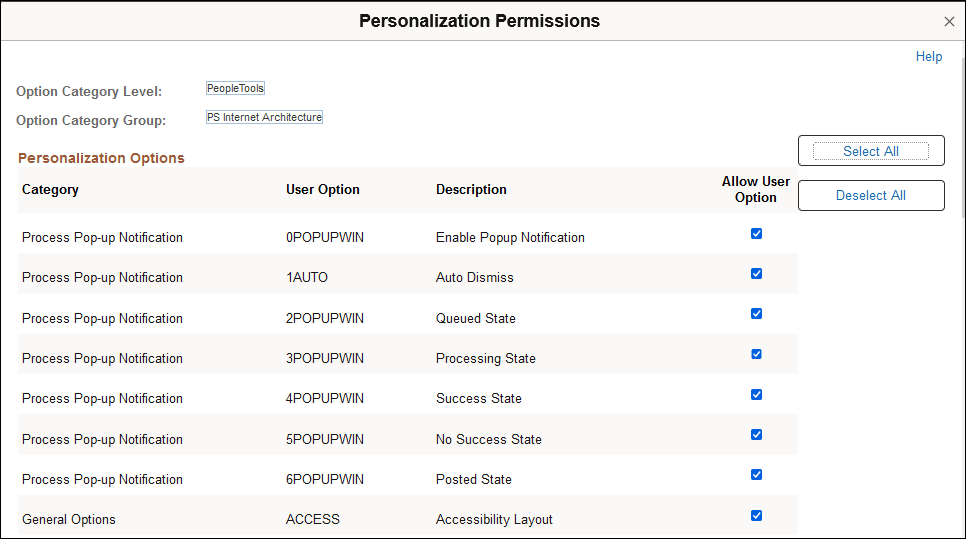
When you click the Edit Options link, the Personalization Permissions page appears.
This example illustrates the fields and controls on the Personalization Permissions page.
| Field or Control | Description |
|---|---|
|
Category |
Categorizes and encompasses a set of options for the end user. This field is display-only. |
|
User Option |
Displays the code associated with the user option, which is the code that the system (PeopleCode) recognizes at runtime. This field is display-only. |
|
Description |
Displays the description of the user option. This field is display-only. |
|
Allow User Option |
Select this check box to enable the user option. |
|
Select All |
Click this button to select the Allow User Option check box for each row in the grid. |
|
Deselect All |
Click this button to clear the Allow User Option check box for every row in the grid. |