Setting Web Library Permissions
Access the Permission Lists - Web Libraries page (select and click the Web Libraries tab).
This example illustrates the fields and controls on the Permission Lists - Web Libraries page.
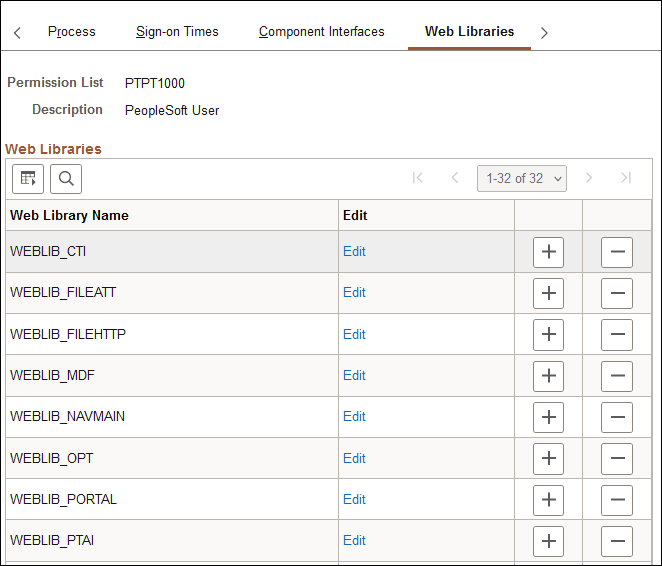
A web library is a derived/work record whose name starts with WEBLIB_. All PeopleSoft iScripts are embedded in records of this type. An iScript is a specialized PeopleCode function that generates dynamic web content.
Administrators should make sure that users have the proper access to web libraries. For example, the default navigation system for application users is implemented using a web library. If users do not have the proper authorization to the web library and its associated scripts, then they will not have proper access to the system. If users are not authorized for a particular web library or script, then they cannot invoke it.
After you add a web library, you set the access for each script function individually. Invoking an iScript requires the assembly of a URL. Developers assemble the URL using PeopleCode.
| Field or Control | Description |
|---|---|
|
Web Library Name |
Displays the web libraries added to the permission list. |
|
Edit |
Click to set access to web library functions. Select from these access rights for each function: Full Access: Select this value to authorize the script. No Access: Select this value to deny access to the script. |
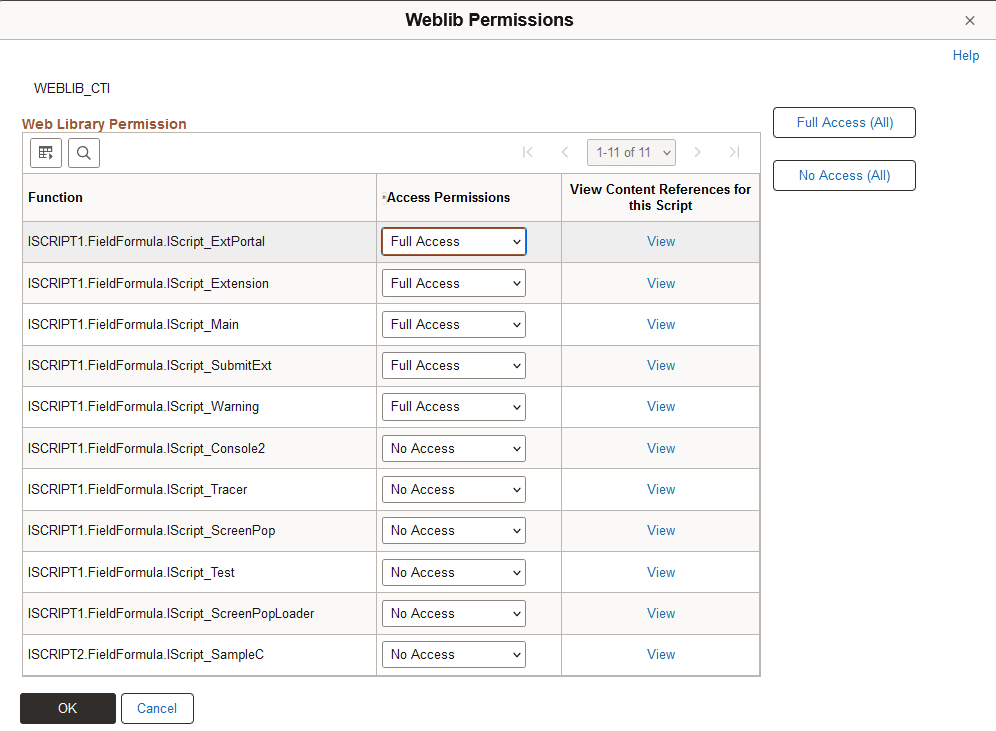
Click the Edit button to authorize each script in the web library:
This example illustrates the fields and controls on the Weblib Permissions page.
| Field or Control | Description |
|---|---|
|
Function |
Displays each script stored in the web library. |
|
Access Permissions |
Click to set access to web library functions. Select from these access rights for each function: Full Access: Select this value to authorize the script. No Access: Select this value to deny access to the script. |
|
Full Access (All) |
Grants full access to all scripts listed on the page. |
|
No Access (All) |
Denies access to all scripts listed on the page. |
|
View |
Click to launch the content reference associated with the iScript. |
Note:
You must grant access to at least one script in the web library, otherwise the system removes the web library from the permission list when you leave the component—even if you save the component.