Setting Web Services Permissions
The web services offered by the PeopleSoft Integration Broker can be secured at the user ID level through the use of the web services permissions you specify. This applies to external web service requests only, not internal web service requests. Internal requests are those submitted from within your PeopleSoft system by a PeopleSoft user of one of your deployed PeopleSoft applications. External requests are those received from third party systems, such as other applications in your organization or other systems outside your organization sending requests over the internet.
If the user ID and password contained in the web service request has the appropriate permissions, the user can invoke the web service. If the submitted user ID and password fails authentication, the user has no permission to invoke the service. If only a User ID is provided, the PeopleSoft system attempts to verify if the user ID is a valid PeopleSoft user. If the verification fails, the system checks if the request is from a trusted node, and then uses the external user ID and password associated with the node from which the request was generated. If the request is not from a trusted node, the system checks the user ID associated with the ANONYMOUS node. How PeopleSoft Integration Broker handles authenticating web service request permissions is discussed in detail in the product documentation for PeopleTools: Integration Broker.
See Integration Broker Administration: Implementing Web Services Security.
Access the Permission Lists - Web Services page (select and click the Web Services tab).
This example illustrates the fields and controls on the Permission Lists - Web Services page.
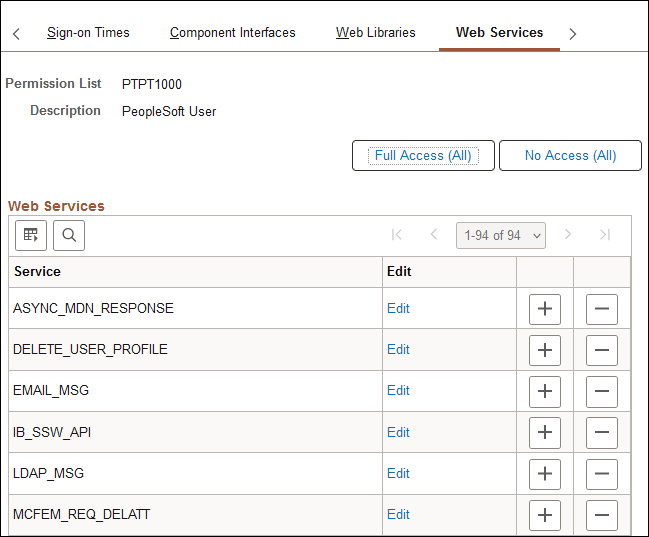
Add the web services to which a permission list should have access. Add and remove web services to and from the list using the standard plus and minus buttons.
Note:
Web service requests contain user IDs. For the web service to be invoked, the submitted user ID must be valid in the PeopleSoft system. For example, the user account cannot be locked, the request must be submitted during the user ID's valid sign-on times, and the user ID must have permission to invoke the web service operation.
Web Services
| Field or Control | Description |
|---|---|
|
Service |
Displays the name of the web service defined in the PeopleSoft system. |
|
Edit |
Click to launch the Web Service Permissions page. |
|
Full Access (All) |
Click to grant full access to all services listed on the page. |
|
No Access (All) |
Click to set all services listed on the page to No Access. |
Web Service Permissions
Access the Web Service Permissions page (click the Edit link on the Web Services page).
This example illustrates the fields and controls on the Web Service Permissions page.
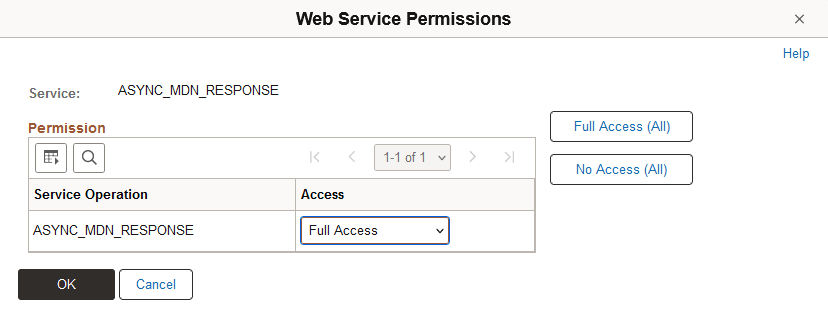
| Field or Control | Description |
|---|---|
|
Service Operation |
Each operation performed by the web service appears in the Service Operation list. |
|
Access |
Grant access to the operation by selecting Full Access. Deny access by selecting No Access. Note: By default, the system sets the value to No Access. Make sure to modify the access values to reflect the desired level. |