Working with Definition Security Permissions
Use the Permission Lists – Definition Security page to:
-
Add definition groups assigned to a permission list.
-
Access the Definition Permissions page to define access to definition types.
Adding Definition Groups to Permission Lists
Use the Definition Security page to assign definition groups to a permission list.
Access the Definition Security page (, and click the Definition Security tab).
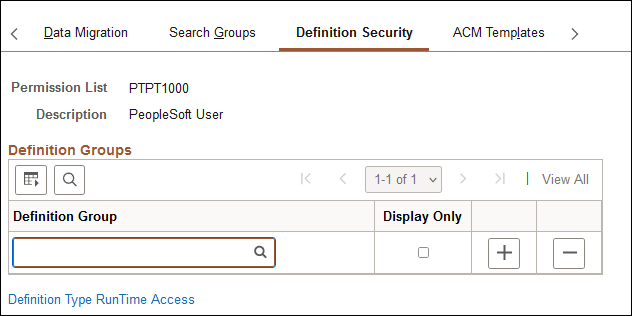
This example illustrates the fields and controls on the Permission Lists – Definition Security page.
| Field or Control | Description |
|---|---|
|
Permission List |
Displays the name of the permission list. |
|
Description |
Displays the description of the permission list. |
|
Definition Group |
Click the Lookup button to search for a definition group to assign to the permission list. |
|
Display Only |
Select the box to allow read-only access to the definition group for users belonging to the permission list. |
|
Definition Type RunTime Access |
Click the link to set definition type runtime access, which is described later in this topic. |
Note that the Group Content Summary – Group Permissions page features similar functionality and enables you to assign permission lists to definition groups.
Defining Definition Type RunTime Access
Use the Definition Permission page to define runtime access to definition types for a permission list.
Runtime access is needed so that applications designed to modify or alter managed objects (objects created in Application Designer) can use the GetDefinitionAccess() built-in function to restrict certain end-users from that functionality. With runtime access, applications can be designed to allow modifying Application Designer objects without allowing access to Application Designer.
Access the Definition Permissions page (click the Definition Type RunTime Access link on the Permission Lists - Definition Security page).
This example illustrates the fields and controls on the Definition Permissions page.
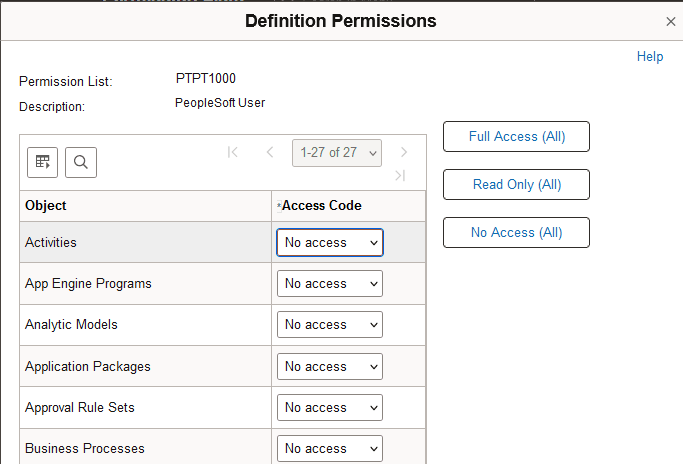
Grant runtime access to the definitions that developers create using PeopleSoft Application Designer. Each type of definition that you create with PeopleSoft Application Designer appears in the definition permissions list.
Note:
On this page, you add permissions to a definition type, such as Application Engine programs. You grant runtime access to specific definitions, such as PeopleSoft Payroll Application Engine programs, using Definition Security.
| Field or Control | Description |
|---|---|
|
Access Code |
Select the appropriate access level. Options are: Full Access: Definitions of the specified type can be modified. For records, this setting allows access to the Build dialog box. No Access: No definitions of the specified type can be opened. Read-Only: Definitions of the specified type can be opened and viewed, but not modified. Update translates only: This level applies only to fields. This setting allows a user to modify only Translate table values. Data admin only: This level applies only to records. It allows a user to modify only those record attributes found in the Tools, Data Administration menu (tablespaces, indexes, and record DDL). Note: Projects cannot be set to No access because Application Designer requires access to a project to launch successfully. |
|
Full Access (All), Read Only (All), and No Access (All) |
Click to set all definition types in the list to the same access level. |
Note:
If change control locking is enabled, the Change Control access setting on the Tools Permissions page can override object types settings.
See Application Designer Developer’s Guide: Building and Maintaining Data, Understanding Definition Security (Windows Client).