DDL Model Defaults
Select and search for your database platform name to access the DDL Model Defaults page.
This page is used to view and edit the DDL for creating tablespaces, indexes and tables. Any changes that you make here are global.
Important:
Oracle recommends that you do not use the DDL Model Defaults page to edit the model SQL because if you edit the SQL incorrectly, DDL generation may fail at runtime and the Record DDL menu item from Application Designer may not work correctly.
This example illustrates the fields and controls on the DDL Model Defaults page. You can find definitions for the fields and controls later on this page.
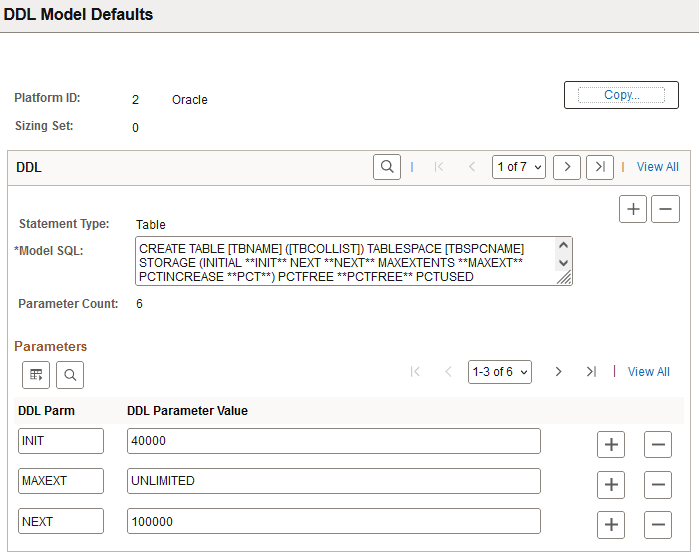
| Field or Control | Description |
|---|---|
|
Platform ID |
Identifies the type of platform of the current database type. |
|
Sizing Set |
Indicates the number of Sizing Sets. Specify multiple Sizing Sets if needed. Sizing Sets are a way to maintain multiple versions of the DDL Model statements for a particular database platform. For example, you could have one sizing set to be used during a development phase, when tables only have test data, and you could have separate sizing set to be used during production, when tables have much more data. |
|
Copy |
Copies information from one sizing set to another. |
|
Statement Type |
Indicates the type of statement that's entered in the Model SQL edit box. Values for this field can be Table, Index, and Tablespace. |
|
Model SQL |
This field displays the model SQL statements, which you can edit. Valid statements are CREATE TABLE, CREATE INDEX, CREATE TABLESPACE, and a platform-specific statement for updating statistics. Some platforms have all the statements, some do not. When you edit the model SQL statements, consider the following:
Note:If the rules for adding new DDL parameters are not adhered to, DDL generation may fail at runtime and the Record DDL menu item from Application Designer may not work correctly. |
|
Parameter Count |
The Parameter Count is calculated based on how many nonblank DDL Parm rows that you define. |
|
DDL Parm |
Enter the DDL Parm (parameter) to which you want to assign a default. |
|
DDL Parameter Value |
The DDL Parameter Value field is where you override a DDL parameter's default value with your own for the selected statement type. |
Using the DDL Model Defaults page, you can maintain DDL model statements and default parameters for Data Mover and Application Designer when DDL (PSBUILD.SQL, for example) is generated during the build process.
Using this utility, you can:
-
Scroll through all the statement types and platforms that are defined in the PSDDLMODEL table.
-
Change the default values or overrides for the parameters in the DDL model statements.
-
Add, delete, or change DDL parameters and values.
Note:
There is no validation performed on the Model SQL statement, the DDL Parm syntax, or the relationship between the statement and the parameters.
The Platform IDs are as follows:
| Number | Platform |
|---|---|
|
1 |
DB2 (no longer supported) |
|
2 |
Oracle |
|
3 |
Informix (no longer supported) |
|
4 |
DB2/Unix (no longer supported) |
|
6 |
Sybase (no longer supported) |
|
7 |
Microsoft |