PeopleTools Tab
Use the PeopleTools tab to provide the information required to connect to DataMover.
This example illustrates the fields and controls on the Runtime Options dialog – PeopleTools tab. You can find definitions for the fields and controls later on this page.
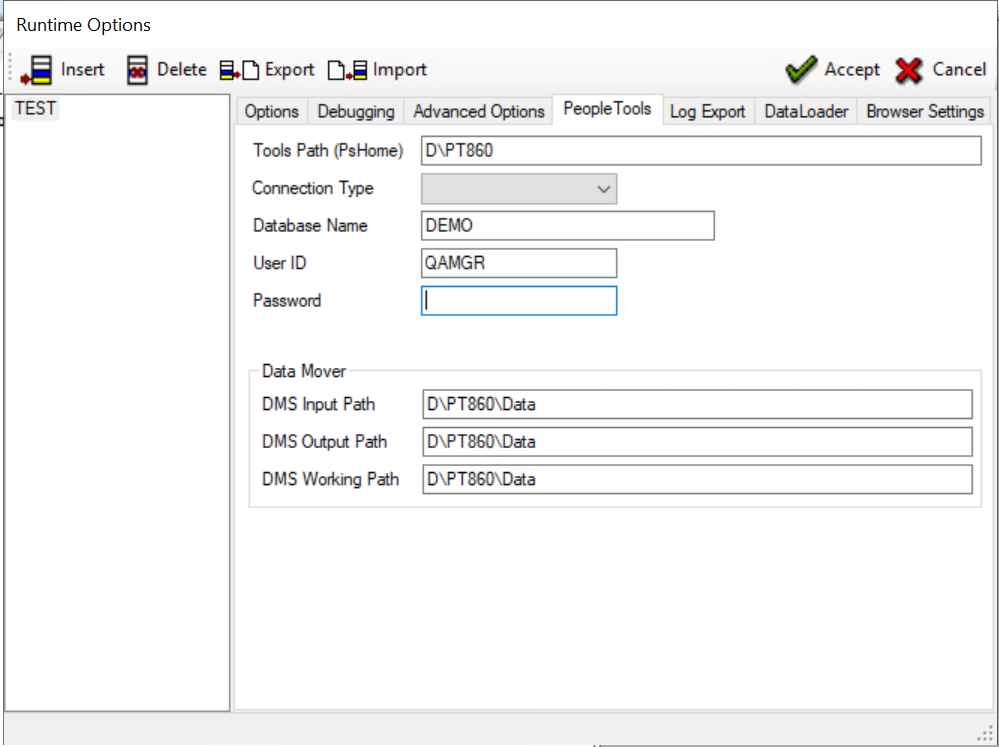
The following fields are on the PeopleTools tab:
| Term | Definition |
|---|---|
|
Tools Path (PsHome) |
Enter the path to PS_HOME for this environment. |
|
Connection Type |
Select the connection type. |
|
Database Name |
Enter the name of the database for this environment. |
|
User ID |
Enter a valid database user ID. |
|
Password |
Enter the password for this user. |
|
DMS Input Path |
Enter the DataMover input path. |
|
DMS Output Path |
Enter the DataMover output path. |
|
DMS Working Path |
Enter the DataMover working path. |