Exporting PeopleSoft 8 Trees to an External File
Use the Tree Export page (RUN_TREEMOVER_EXP) to export trees using TreeMover.
Navigation:
This example illustrates the fields and controls on the Tree Export page.
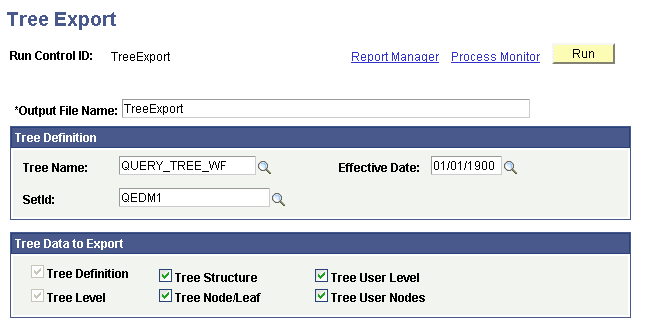
To export a tree to an external file:
-
In the Tree Export page, enter the correct output file name.
Note:
When the PS_TREEBASEDIR environment variable is set, the flat file for the export process is located in %PS_TREEBASEDIR%\<USER>\OutputFilename. You can override this and create another location using the Process Definition Override page.
-
Enter the tree name, effective date, and tree key value.
Note:
The tree key value applies to only setID, business unit, or user-defined key trees (tree key type is set in the tree structure). For trees that have no additional key value, the field is not available.
The default encoding used to export trees is UTF-8.
-
Select the tree data to export.
You can export the tree structure data, the tree definition, the tree levels, the tree level data, the tree nodes and leaves, and the tree node data. You also can export the tree definition, tree level, and tree node/leaf data.
Note:
You need to select Tree Structure if the tree structure does not already exist in the target database. You can also select the Tree User Level option to move related data from the PS_TREE_LEVEL_TBL table, and select the Tree User Nodes option to move related data from the PS_TREE_NODE_TBL.
-
Click the Run button to move the tree. This will export the specified tree as a flat file in the location %PS_TREEBASEDIR%\<USER>\OutputFilename.
If PS_TREEBASEDIR is set as E:\buildArea\TREE_LOC and the user is QEDMO, the file will be exported as E:\buildArea\TREE_LOC\QEDMO\ test_t01.
-
Verify that the settings on the Process Scheduler Request page are correct, and click OK to run the process.
-
Check the run status in the Process Monitor.
If an Error or Warning status exists for the process, check the TreeMover log file which may contain additional information that describes the problem. Potential problems are not limited to – but may include – the following:
-
You tried to export tree level data and the tree has no levels.
-
You tried to export tree user level data and the tree does not use the PS_TREE_LEVEL_TBL for level data.
-
You tried to export tree user node data and the tree does not use the PS_TREE_NODE_TBL.
-