Setting Full Access to the Permissions List
To set full access to the corresponding permission list:
-
Select
-
Select TREE_CHANGE service operation name, and click the Search button.
-
Click the TREE_CHANGE link.
-
In the General page, click the Service Operation Security link.
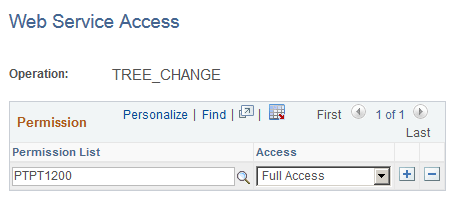
The Web Service Access page appears.
-
Set full access to corresponding permissions list, and click the Save button.
Note:
For additional security setting, check whether the permission list used for your user includes TREE_MAINT queue. Also, check whether TREE_MAINT queue has full access rights.
This example illustrates the fields and controls on the Web Service Access page.